
[Update Added] How we enabled secure investigation of Aurora MySQL from a DevOps Agent ~ AgentCore Gateway + Lambda configuration ~
This is Yuta Kikai (@fat47) from the Service Reliability Group (SRG) of the Media Division.
#SRGThe Service Reliability Group primarily provides comprehensive support for the infrastructure surrounding our media services, focusing on improving existing services, launching new ones, and contributing to open-source software (OSS).
This article describes how I created a database investigation tool using Bedrock AgentCore Gateway and Lambda to securely investigate Aurora MySQL databases from the AWS DevOps Agent.
I hope this is of some help.
I want to investigate Aurora MySQL from the DevOps Agent.Overall structureReasons for choosing AgentCore Gateway + Lambda instead of Aurora MySQL MCP ServerWhat is Amazon Bedrock AgentCore Gateway?Features implemented with LambdaThings we did to safely investigate the databaseGateway authentication is restricted using Cognito JWT.Gateway authentication is restricted by SigV4/IAM Role authentication.DB users have read-only access.The SQL validator blocks dangerous SQL queries.Adding an MCP server to the DevOps Agent and creating skillsResults of the DB incident investigationIn conclusion
I want to investigate Aurora MySQL from the DevOps Agent.
The DevOps Agent is a feature that was generally released on March 31, 2026, and it uses information from CloudWatch and AWS resources to investigate the cause of incidents and propose recovery solutions.
For more details, please refer to my previous blog posts.
While the DevOps Agent thoroughly investigates resources within AWS, it cannot access data within databases.
However, in actual troubleshooting, it's often necessary to look at the contents of the database as well as the status of AWS resources.
For example, when an application using Aurora MySQL experiences errors or latency issues, you might want to check the following:
- What tables are in the target database?
- What is the table structure? Are the indexes properly applied?
- What happens to the EXPLAIN output of the problematic SELECT statement?
- What are the trends regarding table size and number of rows?
Since the DevOps Agent has an MCP integration function, this can be achieved if you have an MCP that can connect to Aurora MySQL.
Overall structure
[Added in May 2026]
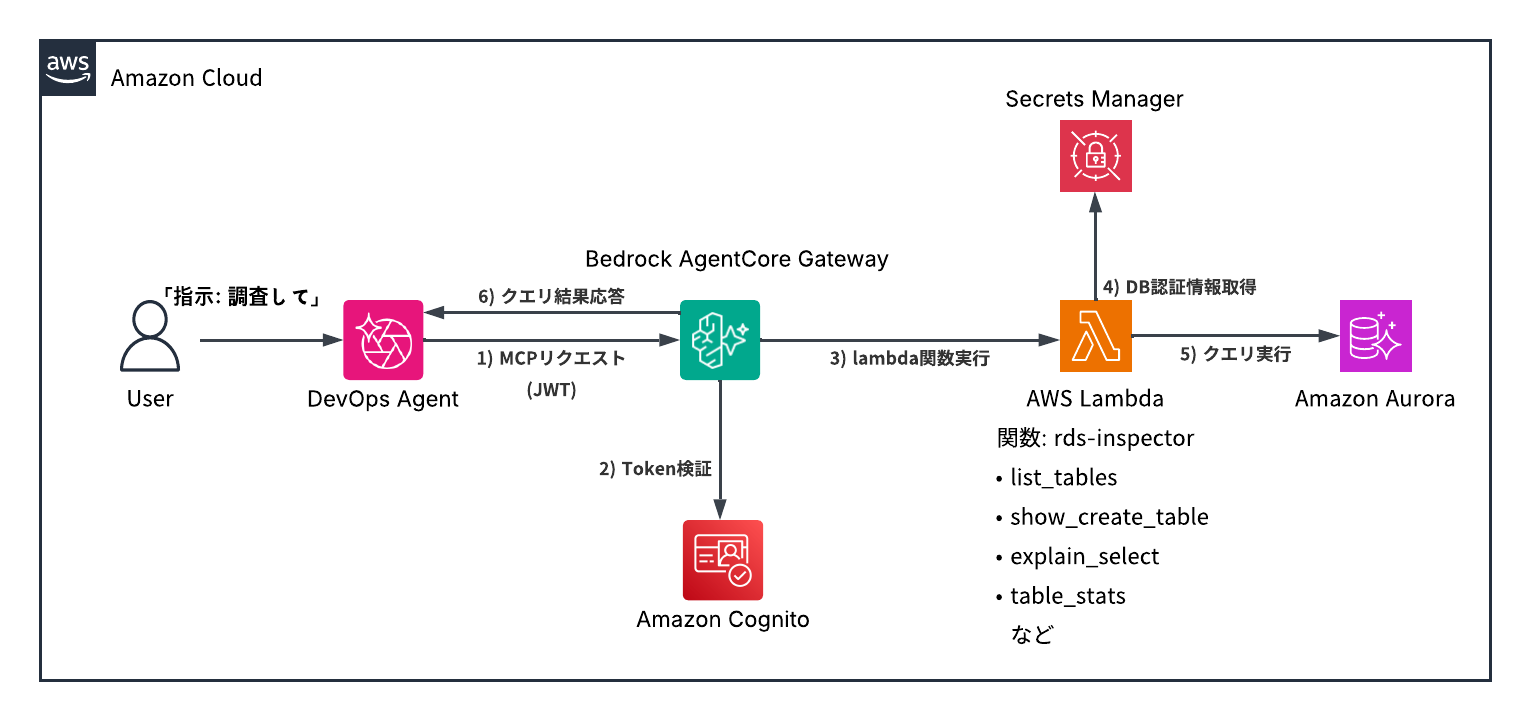
When this blog post was published at the end of April 2026, SigV4/IAM authentication was not available as an authentication method for MCPs that could be registered with the DevOps Agent. However, in May, this authentication method was added, so we changed the authentication method in this configuration from Cognito-based authentication to SigV4/IAM authentication.
(Before change) Configuration of JWT authentication using Cognito
(After change) SigV4/IAM authentication
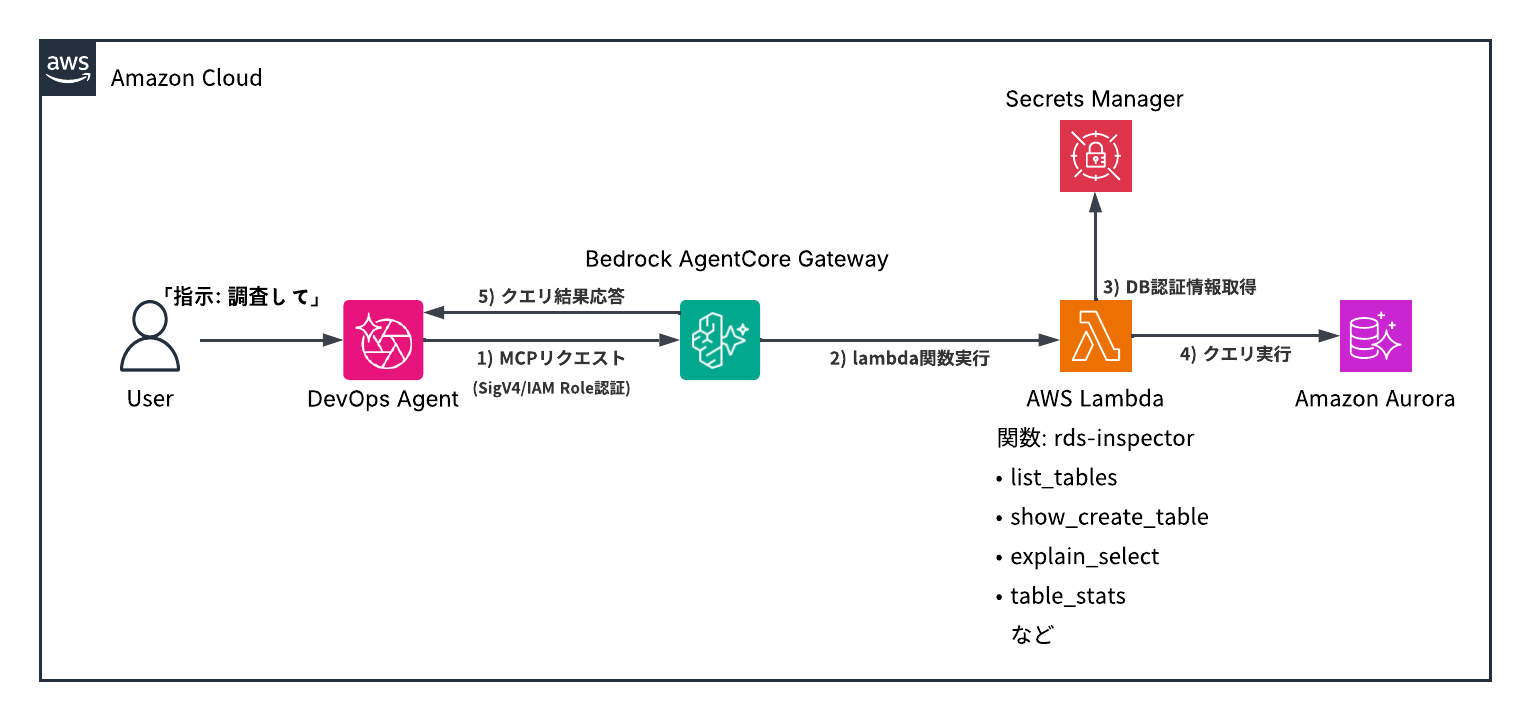
The general flow is as follows:
- Users issue investigation commands to the DevOps Agent.
- The DevOps Agent sends an MCP request to the AgentCore Gateway.
- AgentCore Gateway invokes Lambda using the Gateway IAM Role.
- Lambda executes processing to investigate Aurora MySQL based on the tool name and arguments.
- Lambda executes queries to Aurora MySQL via the RDS Data API.
- The results are returned to the DevOps Agent via AgentCore Gateway.
Reasons for choosing AgentCore Gateway + Lambda instead of Aurora MySQL MCP Server
Initially, AWS LabsAurora MySQL MCP ServerI thought it could be easily achieved using [this method].
However, the MCP server added from the DevOps Agent needs to be reachable as a remote MCP endpoint.
On the other hand, AWS Labs' MySQL MCP Server was configured to be used via stdio from a local MCP client, so it couldn't be used as is.
Furthermore, even if a MySQL MCP Server were available, this MCP server primarily uses `run_query` to accept arbitrary SQL queries, although it does have read-only control and some risk pattern detection.
Therefore, it lacks mechanisms to limit the load impact of read queries, such as high-load SELECTs, massive JOINs, and large-scale retrievals without limits, depending on the application.
For this application, we intended to use it for initial troubleshooting of a production Aurora MySQL database. Therefore, instead of a general-purpose SQL execution tool, we configured it to expose only a tool specifically for troubleshooting using AgentCore Gateway + Lambda.
What is Amazon Bedrock AgentCore Gateway?
Amazon Bedrock AgentCore Gateway (hereinafter, AgentCore Gateway) is a managed gateway that behaves as a single MCP endpoint from the perspective of an agent. When you register Lambda functions, APIs, etc., as targets, the Gateway exposes them as MCP-compatible tools.
AgentCore Gateway is not just a mechanism that exposes the MCP endpoint to the public; it also allows you to set up authentication at the entry point. In this case, we added Cognito JWT authentication to the AgentCore Gateway's MCP endpoint, configuring it to accept only legitimate requests from DevOps agents.
Features implemented with Lambda
Register the Aurora MySQL investigation Lambda function as a Target in AgentCore Gateway.
This time, I created a Lambda function called rds-inspector and implemented the following tool.
| Tool | function |
|---|---|
| list_databases | DB List |
| list_tables | Table List |
| show_create_table | Table structure display |
| show_indexes | Index display |
| explain_select | EXPLAIN SELECT execution plan display |
| table_stats | Information_schema.TABLES displays estimated row count, data/index size, etc. |
In AgentCore Gateway's Lambda Target, you define the tool's inputSchema.
For example, show_create_table looks something like this:
Once you register a tool definition in AgentCore Gateway, it will appear as an MCP tool to the DevOps Agent.
Things we did to safely investigate the database
In this configuration, we've enabled the DevOps Agent to investigate Aurora MySQL, but we haven't allowed the Agent to freely execute SQL queries. We've implemented restrictions at several layers to ensure security.
Gateway authentication is restricted using Cognito JWT.
Gateway authentication is restricted by SigV4/IAM Role authentication.
Upon checking in May 2026, I found that SigV4 authentication had been added without prior notice.
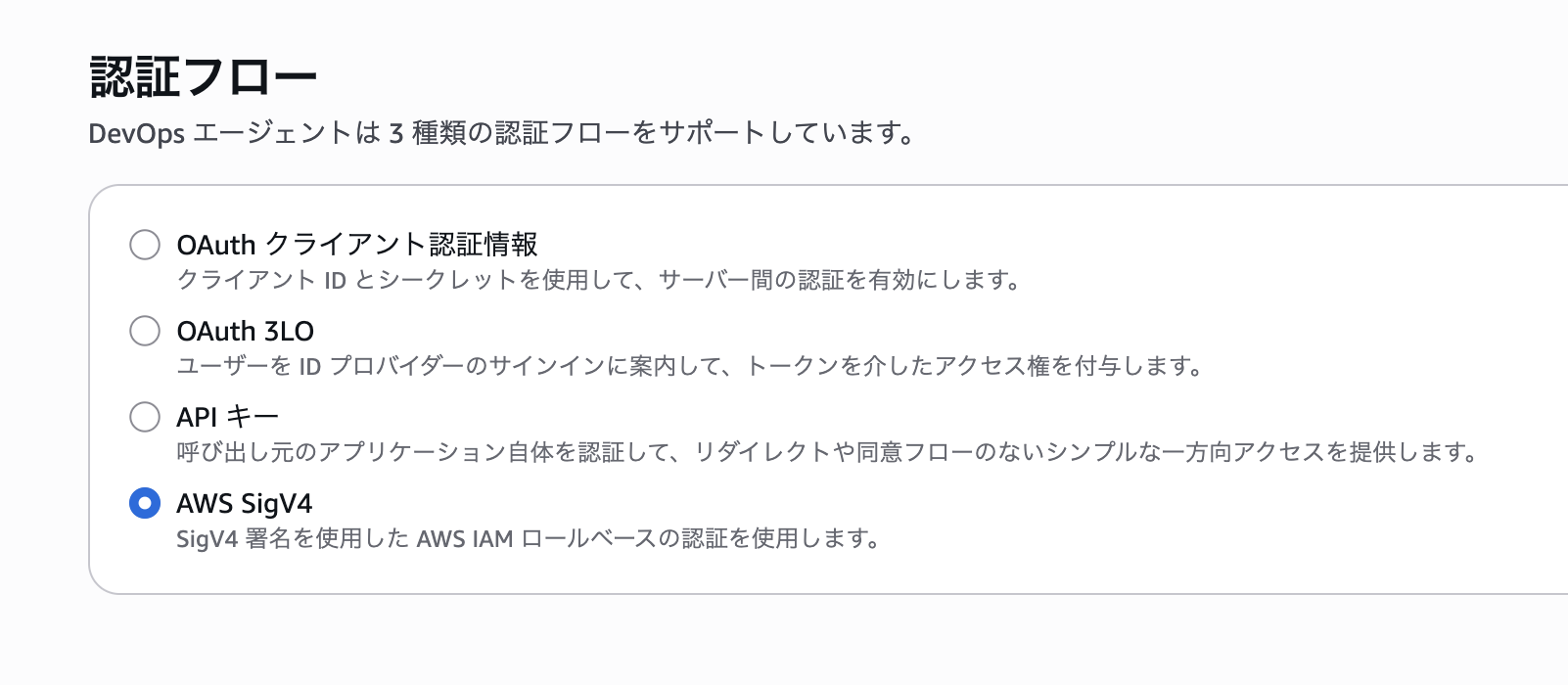
This update eliminates the need for JWT authentication using Cognito, as mentioned earlier. We have configured an IAM Role policy that allows access only from the DevOps Agent and linked it to the Gateway.
DB users have read-only access.
I'm executing queries using the RDS Data API, but the DB user I'm using is a read-only user with access only to the schema being investigated.
The SQL validator blocks dangerous SQL queries.
explain_select- NG (Reject anything other than SELECT)
- DDL/DML is rejected.
- INTO OUTFILE is rejected.
- FOR UPDATE / LOCK IN SHARE MODE is rejected.
- SLEEP() and BENCHMARK() are rejected.
Even if a database user has read-only access, large SELECT statements and SQL queries involving locks can still impact the service, so we've implemented a SQL validator to control them.
Adding an MCP server to the DevOps Agent and creating skills.
First, register the AgentCore Gateway we just created as an MCP server in the DevOps Agent.
In the authentication flow, select "AWS SigV4" and specify an IAM Role. This Role has a trust policy that restricts assumption to only the DevOps Agent service, and grants only the least privileges (bedrock-agentcore:InvokeGateway) to call the target AgentCore Gateway.
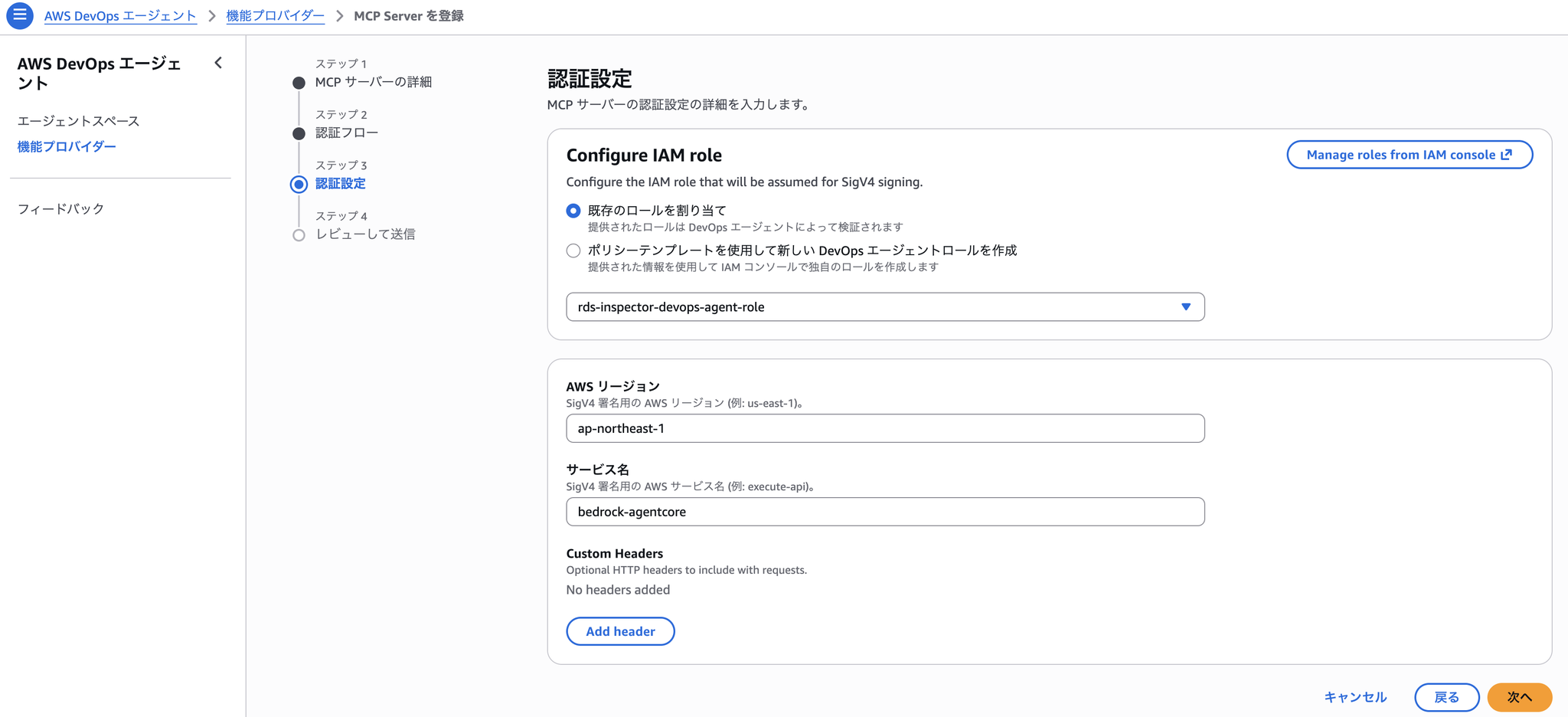
On the Gateway side, we've also added a Resource Policy that says "Deny access to all IAM Roles except this one."
Next, we'll configure the skills so that the DevOps Agent can perform database investigations effectively.
Skills is a feature added in the GA release that allows you to specify the components and tools that the DevOps Agent will investigate, thereby improving the reproducibility of investigation accuracy.
Skills can be added directly.
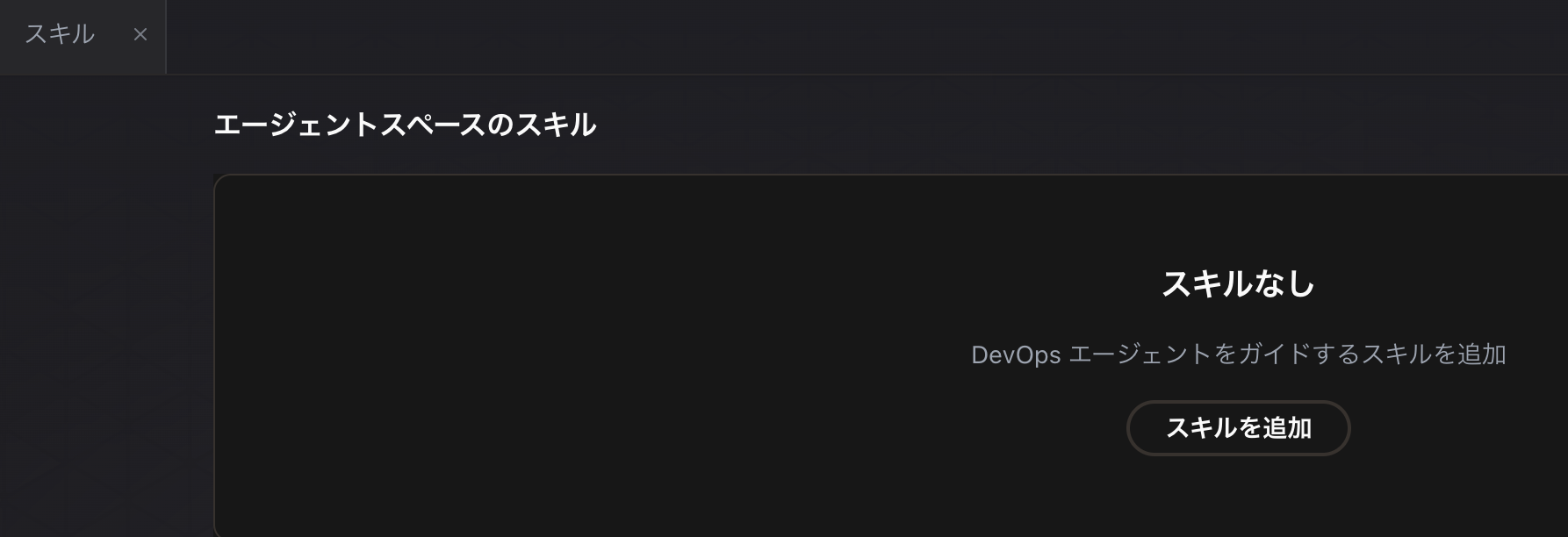
Skills can also be created through chat conversations with the DevOps Agent, so we will create them using this method.
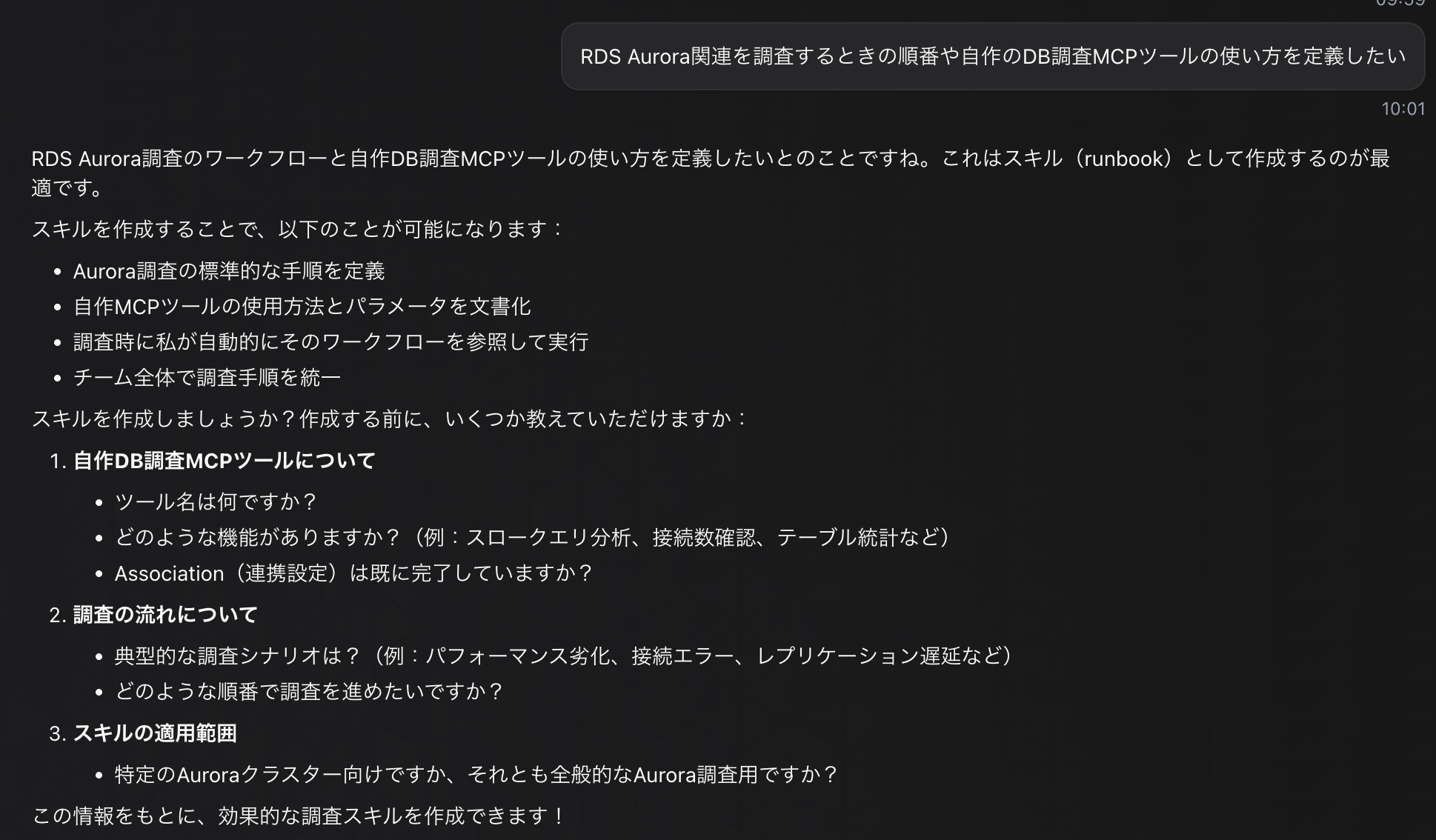
I answered the following questions:
This specifies how to use the tools and the order in which to investigate database metrics, etc.
The skills created as a result are as follows:
Skill name:
- investigate-rds-aurora-performance
Description
SKILL.md
Results of the DB incident investigation
Investigation Instructions: "Currently, the load on Aurora MySQL is not high, but please investigate XXX-cluster assuming it was under high load."
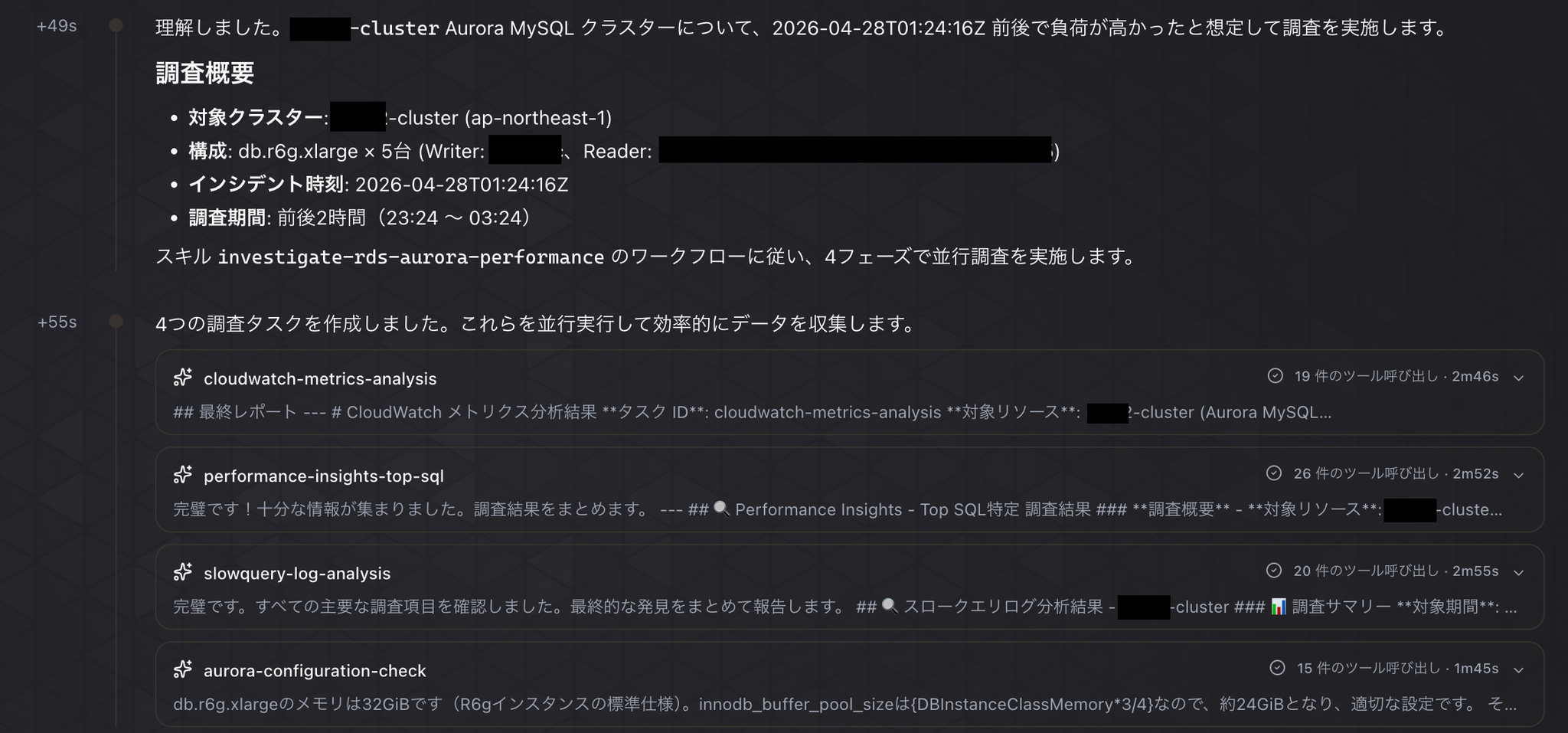
The investigation began according to the carefully prepared skills.
As instructed, we can see that they are analyzing performance insights and slow logs while looking at the entire CloudWatch metrics, and using MCP tools to check the table structure for the slow queries they found.
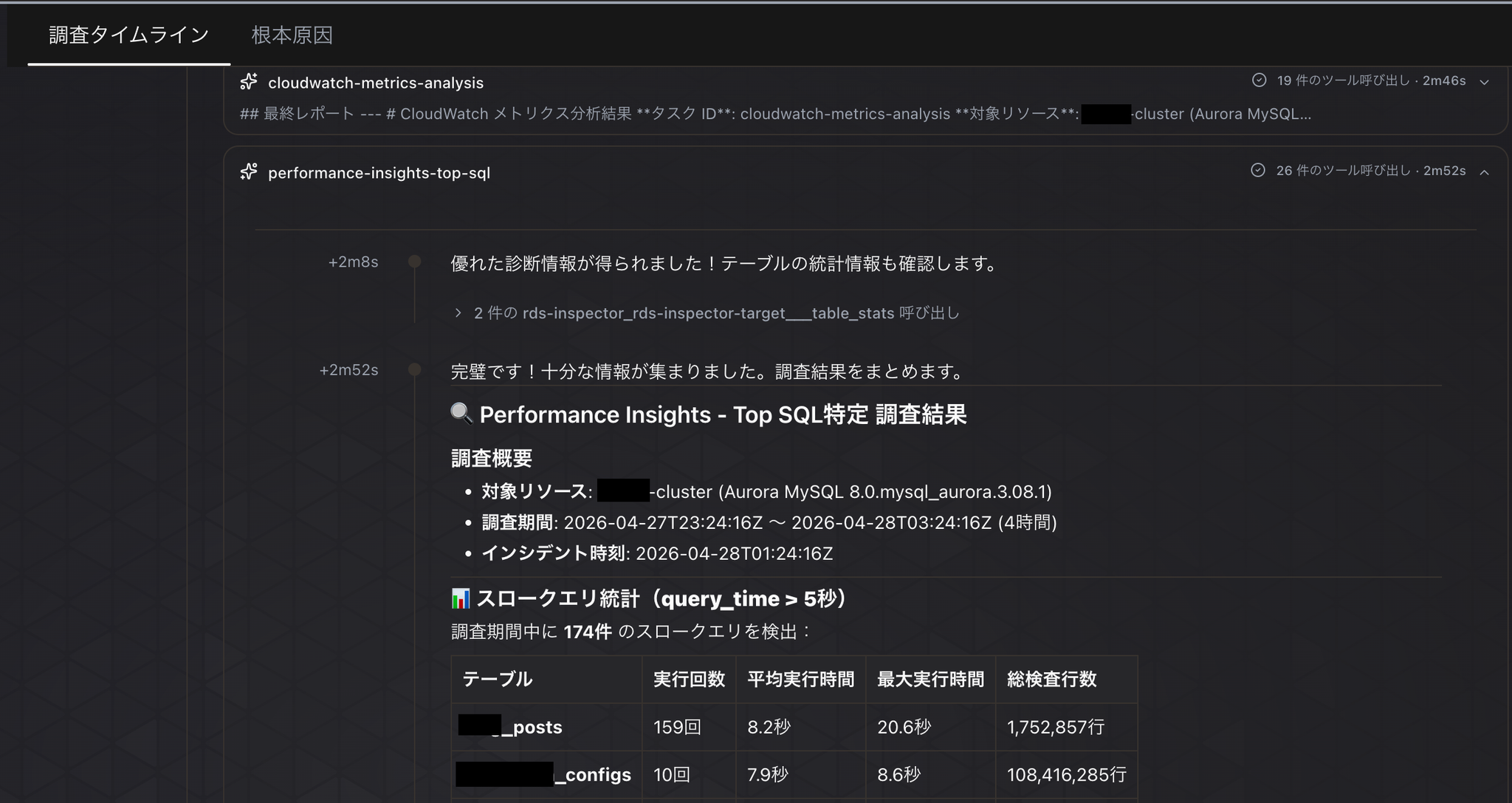
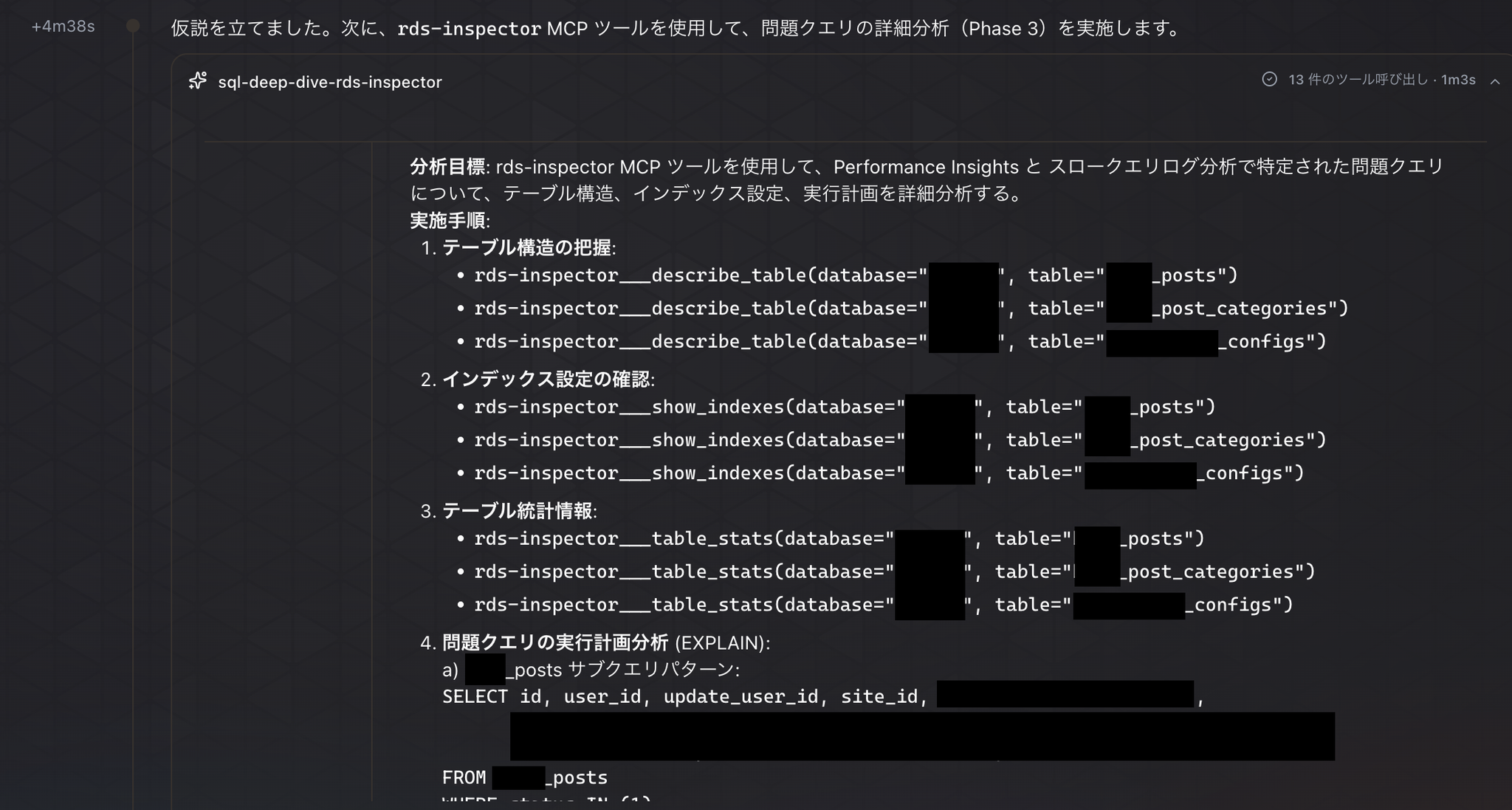
And now, to test our current hypothesis about the cause, we've started using MCP tools to conduct a detailed analysis of the query in question.
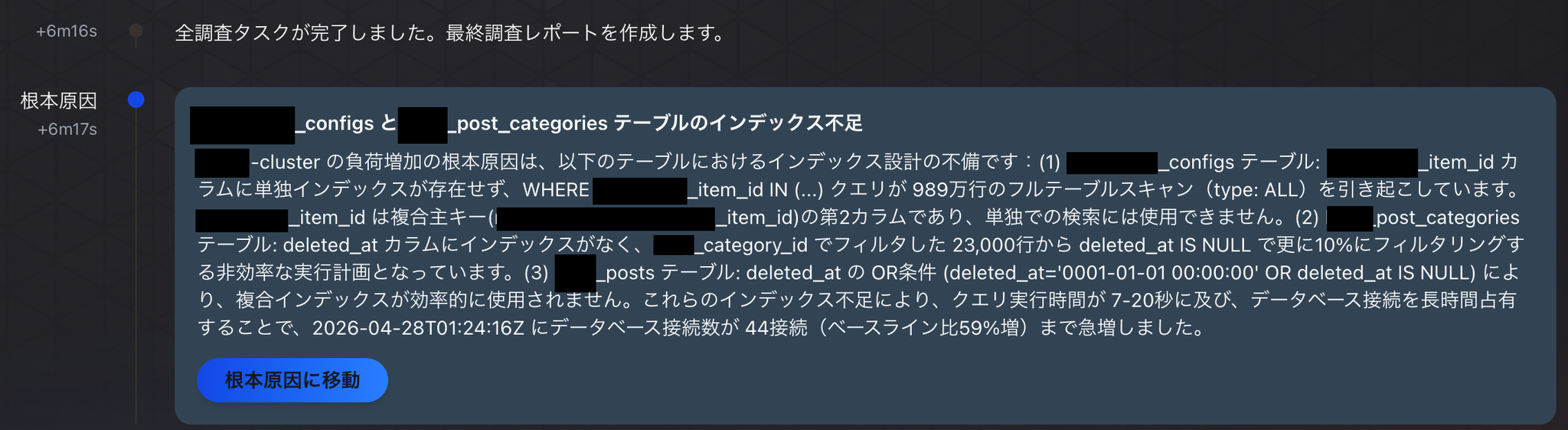
Ultimately, the cause was concluded to be a lack of indexes on a specific table.
In conclusion
By adding the ability to investigate Aurora MySQL database data to the DevOps Agent, it has become a more practical incident investigation agent.
[Update] SigV4/IAM authentication was added in May 2026! I never expected it to be added just about 10 days after the blog post was published. This meant that Cognito was no longer needed, allowing for a simpler configuration.
While the release notes don't specify when this SigV4 authentication was added, the fact that it's supported is mentioned in the official documentation.
Thank you AWS for the update!!
Let's all start using the DevOps Agent more and more!
If you are interested in SRG, please contact us here.