

Switching to ARM on Amazon EC2 has brought nothing but happiness.
SRGThe Service Reliability Group primarily provides comprehensive support for the infrastructure surrounding our media services, focusing on improving existing services, launching new ones, and contributing to open-source software (OSS).
IntroductionWhat's so great about AWS Graviton?Making it compatible with ARM, etc.From x86_64 to AArch64 AnsibleNginxtd-agentAbout entropyhavegedresultperformanceALB Response TimeLoad Average
Introduction
Many people have heard the term "ARM" frequently in relation to the Apple M1, and were surprised by its performance. The benchmark results for Macs equipped with the Apple M1 areHere
And Amazon EC2 (hereinafter: EC2) also has instances equipped with Arm.https://aws.amazon.com/jp/ec2/graviton/
This time, I was able to migrate the entire development environment of a certain service from m5.large to t4g.medium EC2 instances, and it made me very happy. I hope that by reading this article, you will be able to understand the advantages of Arm instances, even just a little.
What's so great about AWS Graviton?
EC2 instances powered by Arm processors offer better performance at a lower price than instances powered by traditional Intel/AMD processors, making them very cost-effective.
Currently (as of November 19, 2020), it is deployed not only on EC2 but also on Amazon RDS and Amazon ElastiCache.https://aws.amazon.com/jp/about-aws/whats-new/2020/10/achieve-up-to-52-percent-better-price-performance-with-amazon-rds-using-new-graviton2-instances/https://aws.amazon.com/jp/about-aws/whats-new/2020/10/amazon-elasticache-now-supports-m6g-and-r6g-graviton2-based-instances/
I also wrote an article six months ago comparing the m6g.large, which features an ARM processor, with the older m5.large.https://blog.luispc.com/entry/2020/05/18/190613
Making it compatible with ARM, etc.
Since the Arm-compatible service is managed by Ansible and Terraform, we'll start by enabling Arm compatibility in Ansible.
From x86_64 to AArch64 Ansible
First, the key is whether the middleware and other components support AArch64. Note that some middleware has version differences between x86_64 and AArch64.
The middleware that needed modification in this project was the following:
- Nginx
- td-agent
The service we recently made ARM compatible had a well-maintained Ansible setup, so we were able to implement ARM compatibility using Ansible in less than a business day. I'm incredibly grateful to the previous person in charge.
Nginx
The official Nginx repository provides packages for AArch64 starting from CentOS 8, but since this is CentOS 7, I used the EPEL version instead.
td-agent
The official td-agent repository includes an AArch64 package for CentOS 7 (from v4.x onwards).
We were able to implement AArch64 support without making any configuration changes to the middleware.
About entropy
In EC2's Arm architecture, very low entropy for random devices can sometimes lead to errors or significant performance degradation.
In this instance, the performance of the random number generation part using Apache Tomcat (Java) significantly decreased. This is because the random number generator uses `/dev/random`, and there are insufficient resources allocated to it.
When we check the entropy of t4g.medium
There were only 11.
haveged
The solution to this is `haveged`.https://wiki.archlinux.jp/index.php/Haveged
Installation is easy with yum, and after installation, it starts with systemd.
The entropy count after activation was 1401.
Once you've prepared Ansible, simply create an ARM-based EC2 instance, run Ansible to verify its operation, and add it to the target group. If there are no problems, you can simply remove the x86_64 EC2 instance and switch over without any maintenance.
result
We haven't set up the production environment yet, but we've switched our entire development environment to Arm. This time, we switched from m5.large to t4g.medium.
In terms of the price per hour
- m5.large: $0.124/h
- t4g.medium: $0.0432/h
Please note that the price difference is about three times.
performance
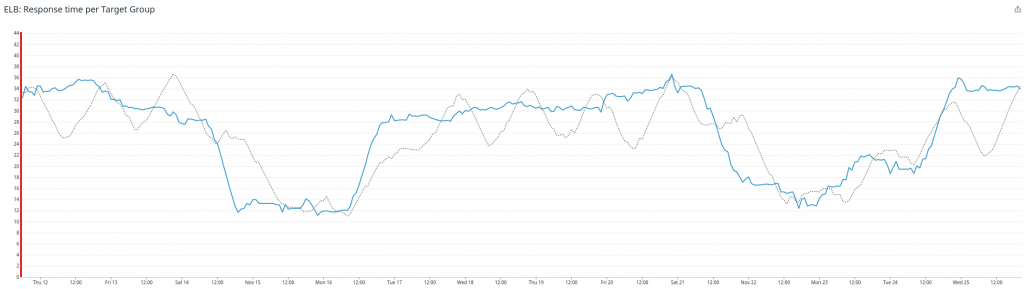
The red vertical line indicates the point after the switch.
ALB Response Time
The gray line is m5.large
Load Average
Blue: 1 minute / Purple: 5 minutes / Yellow: 15 minutes
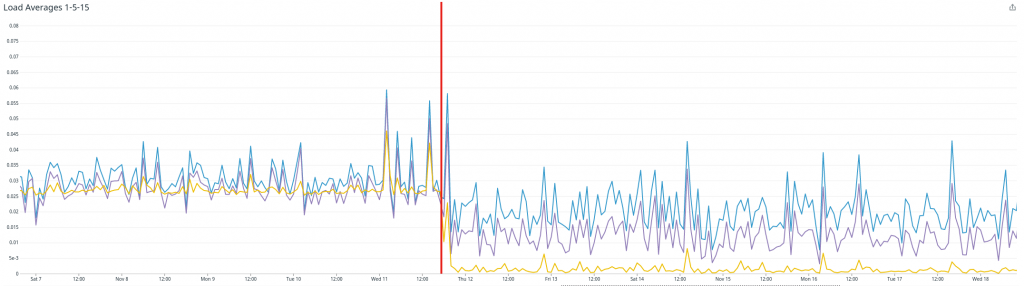
Despite the price difference, with m5.large costing three times as much as t4g.medium, I think it's safe to say there's no performance difference. Since we have 26 EC2 instances in our development environment, a simple calculation of the Arm migration costs would be...
0.124 * 720 * 26 = $2321.28/month0.0432 * 720 * 26 = $808.704/month
This is the result.
Switching development environments only without performance degradationOver 1.8 million yen per yearWe were able to reduce costs. In the production environment, we will switch from m5.(x)large to m6g.(x)large, so the price difference will be smaller, but as this article explains, the performance difference is even greater, so I think it is well worth doing.https://blog.luispc.com/entry/2020/05/18/190613
SRG is looking for new team members!
If you're interested, please contact us here!