

Deep Dive into VPC CNI: A Thorough Analysis of IPAMD and Security Groups for Pods
#SRGThe Service Reliability Group primarily provides comprehensive support for the infrastructure surrounding our media services, focusing on improving existing services, launching new ones, and contributing to open-source software (OSS).
add cmd: failed to assign an IP address to containerAWS VPC Add-onstructureLifecycleDetails of CNI PluginDetails of IPAMD Pluginbig pictureRegarding the "failed to assign an IP address to container" error.Security Groups For PodsstructureSetup instructions and explanation of ENVconstraintsReferencesIn conclusion
AWS VPC Add-on
AWS VPC CNI plays a central role in EKS's networking configuration, streamlining network management on EKS through its native integration with AWS VPC.
AWS VPC CNI is composed of the following components:
- CNI Plugin
In accordance with the CNI specifications, communicate with IPAMD using gRPC to obtain an IP address and configure network settings.
- IPAMD Plugin
Each node manages an AWS ENI and pre-assigns IP addresses for rapid Pod startup.
The relationships between them areProposalThis is based on the diagram shown (the actual names used may differ slightly).

structure
VPC CNI primarily provides IP address assignment and network routing capabilities for Pods.
- Pod IP assignment
IP address assignment to Pods is done using EC2 ENIs and IPAMD. The general flow is as follows:
- Network routing
- Pod ↔ External Network: IPTABLE
- Pod ↔ Pod: Routing Table
Network routing between Pods and from Pods to the outside world is configured using multiple routing tables and IPTABLES. The differences in their usage are as follows:
Like a normal SNAT, this is performed as packets pass through the virtual network interface (veth) and EC2 ENI (such as eth).
Communication between Pods and communication from Pods to the outside world primarily takes place via veth and eth, and various routing tables are implicitly applied.
Lifecycle
There are mainly seven types of VPCCNI binaries.
| Binary | explanation |
|---|---|
| aws-k8s-agent | IPAMD's gRPC server |
| aws-cni | Implementation of the CNI Plugin, primarily for managing settings such as ENI/IP and Linux Network within a VPC. |
| grpc-health-probe | Health probe verification tool for IPAMD |
| cni-metrics-helper | A support tool for collecting metrics and putting them into CloudWatch using PutMetrics. |
| aws-vpc-cni-init | (Initialization components to ensure that prerequisites are met, such as system parameters, IPv6, and duplication of each binary file. |
| aws-vpc-cni | In the pastIt existed as a tool for starting up and managing the lifecycle of IPAMD. |
| egress-cni | The CNI Plugin implementation primarily uses SNAT to manage specific routing rules and policies for outbound traffic. |
entrypoint.shExecution order
/host/opt/cni/bin
- Launch IPAMD
grpc-health-probe
Make it runIt is currently being used as an InitContainer, so it is commented out.
InitContainer- Copy the CNIConfig file to the designated directory in kubelet.
- Waiting for IPAMD to start up
grpc-health-probeDetails of CNI Plugin
aws-cniplugins/routed-eni/cni.goFile structure
CNI Plugin Registration
cmdDelPluginMainWithError
- Specifications of the CNI Plugin itself:https://www.cni.dev/docs/spec/#cni-operations
Add command
- Load settings
add cmd: error loading config from args
POD_SECURITY_GROUP_ENFORCING_MODE- Loading Kubernetes arguments
cniTypes.LoadArgs- Setting up gRPC connection to IPAMD
- Additional API Request for Network
AddNetworkAddNetwork- Implementation of network settings
driverClient.SetupBranchENIPodNetworkPodVlanIdWireless Commands
- Load settings
It's the same as the Add command.
- Loading Kubernetes arguments
It's the same as the Add command.
- Deletion attempt based on previous results
tryDelWithPrevResult- Setting up gRPC connection to IPAMD
- Network Deletion API Request
DelNetwork- Cleaning up network resources
This process involves releasing Pod IPs, etc. If SGP is used, it will also delete the Branch ENI.
Details of IPAMD Plugin
pkg/ipamd/*File structure
IPAMD Processing Overview
- The initialization process includes the following:
- Verifying connection with the Kubernetes API Server
- k8s API Client initialization
- Initializing a Recorder to issue k8s Events
- Initialization of IPAMD Client
NodeIPPoolManager
ipamd.log- Starting the Prometheus Metrics API Server in a separate goroutine
/metrics:61678- Starting the Introspective API Server in a separate goroutine
- Retrieve ENI information from IPAMD Context
- Retrieve a specific ENI configuration name from Node information.
- Get debug information for network settings
- Get debug information for IPAMD environment settings
Similarly, it will start unless disabled by environment variables. This Introspection API is used to monitor and diagnose the operational status of IPAMD. Currently, the Introspection API provides the following four main functions:
- Starting the gRPC Server
big picture

failed to assign an IP address to container
AddNetworkAddNetwork Processing Overview
- Processing when PodENI is enabled (using SGP)
vpc.amazonaws.com/pod-eni"vpc.amazonaws.com/pod-eni"
The Pods targeted by SGP will be modified by VPCCNI in the following two places:
- If an IP address does not exist in the annotation, retrieve the IP address from the EC2 ENI Datastore.
- If an IP address exists in the annotation, add that IP address to the existing VPC IP Pool.
- Sends a response to add an IP address to the CNI Plugin.
If an error occurs at any point in the process described above, the Pod startup will be delayed.This error may appear repeatedly.
WARN| Log message | explanation | Relationship with SGP activation | Guessing the cause |
|---|---|---|---|
| The version information held by CNI and IPAMD does not match. | none | DaemonSet update timing issue | |
| IPAMD failed to retrieve annotation information because the Pod with the received Pod name does not exist. | can be | Bugs in the Annotation and Resource Profile management mechanism. | |
| The Trunk ENI installed on the Node does not exist, or LinkIndex information cannot be obtained. | none | Some kind of bug | |
| Annotation information parsing failure | can be | Bugs in the Parser itself and its usage. |
More than 50 similar issues have been reported between 2020 and 2022. The main cause is believed to be a bug in AWS VPC CNI itself.
In addition, the following are also common causes:
- Using an EC2 Instance Type that does not support SGP (e.g., using a t-series instance type)
- The number of Pods is sufficient to create a Trunk ENI.Branch ENI countIt exceeded expectations.
Security Groups For Pods
This feature applies Security Groups at the Pod level, rather than the Node level. This enhances communication security between EKS Pods and other services within the VPC.
A common use case is controlling communication between EKS Pods and RDS/ElastiCache.
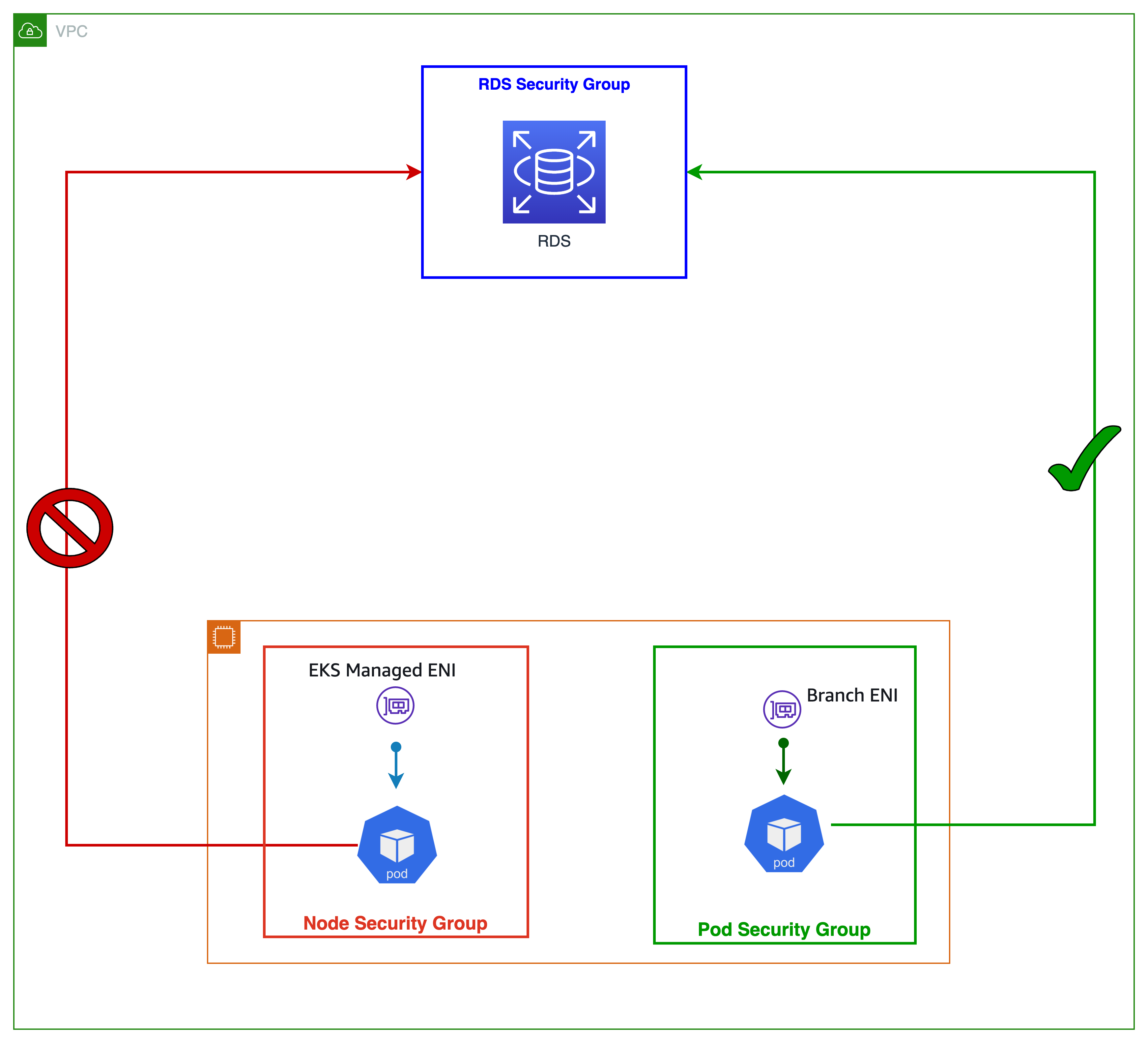
structure
aws-nodeSetup instructions and explanation of ENV
Starting with VPCCNI v1.14, the essential step for enabling SGP is to configure the following settings for the container target.
DaemonSet
ENABLE_POD_ENI=true
POD_SECURITY_GROUP_ENFORCING_MODE=standard
Prior to version 1.10, when using Liveness/Readiness Probes, the following settings also need to be configured for initContainers.
DISABLE_TCP_EARLY_DEMUX=true
POD_SECURITY_GROUP_ENFORCING_MODEAbout ENFORCING_MODE
- Strict mode
- All inbound/outbound traffic to Pods with Security Groups (SGs) is controlled solely by the SGs of the Branch ENI. On the other hand, all inbound/outbound traffic between Pods enters the VPC.
- Standard mode
- (Within the VPC) All communications are subject to both the Primary ENI and Branch ENI Security Groups (SGs).
- All inbound/outbound traffic to Pods with SG is controlled solely by the Branch ENI's SG. However, inbound/outbound traffic from kubelet is controlled by the Node SG, and the Branch ENI's SG rules do not apply to it.When using SGP, you need to configure both NodeSG and Branch ENI SGs on the Pod simultaneously.
- The following conditions apply to outbound traffic to locations outside the VPC (External VPN/Direct Connection/External VPC).
AWS_VPC_K8S_CNI_EXTERNALSNATAWS_VPC_K8S_CNI_EXTERNALSNAT
Regarding WARM_* and IP_COOLDOWN_PERIOD
IP_COOLDOWN_PERIODAny of the WARM targets do not impact the scale of the branch ENI pods so you will have to set the WARM_{ENI/IP/PREFIX}_TARGET based on the number of non-branch ENI pods. If you are having the cluster mostly using pods with a security group consider setting WARM_IP_TARGET to a very low value instead of default WARM_ENI_TARGET or WARM_PREFIX_TARGET to reduce wastage of IPs/ENIs.
constraints
- As mentioned earlier, when creating a SecurityGroupPolicy, the SecurityGroup to be configured for a Pod must include both Branch ENI SG and Node SG.
- Since Trunk ENIs are included in the number of ENIs a Node can have, if the number of ENIs on a Node reaches the number of ENIs supported by the Instance Type being used, Trunk ENIs will not be created, and therefore, Pods to which Security Groups (SGs) are applied will not be created on that Node.
- There is a limit to the number of Branch ENIs (i.e., Pods) that a runk ENI can create. This is not mentioned in the documentation, so please refer to this [link/reference].Source codePlease calculate the actual number from the Map. The calculation method is as follows:
IsTrunkingCompatible: true
- Pod restarts after applying SGP take longer than usual, so please adopt the optimal Deployment Update Strategy.
References
In conclusion
VPCCNI has finally become usable as a Network Policy Engine. It has continued to evolve since 2019, and its usability has improved recently. I have high hopes for the future of VPCCNI.
The official SGP tutorial documentation is shown in a red box.ImportantImportant information and constraints are listed there. It would be important to review them repeatedly.
Understanding the source code related to IPAMD and SGP significantly improved the accuracy of my troubleshooting. I would like to continue trying this learning method in the future.
SRG is looking for new team members.
If you are interested, please contact us here.
SRG runs a podcast where we chat about the latest hot IT technologies and books. We hope you'll enjoy listening to it while you work.