
I'm wondering if my Aurora MySQL backups are truly safe with the current settings.
This is Yuta Kikai (@fat47) from the Service Reliability Group (SRG) of the Media Management Division.
#SRGThe Service Reliability Group primarily provides comprehensive support for the infrastructure surrounding our media services, focusing on improving existing services, launching new ones, and contributing to open-source software (OSS).
This article summarizes how to design secure backups for Aurora MySQL.
I hope this is of some help.
Is Aurora MySQL backup really safe?Organizing backup methods for Aurora MySQL1. Automatic backup (native feature) and PITR2. Manual snapshots3. AWS BackupLet's consider two types of threat models.[Threat A] User error/App malfunction[Threat B] AWS Account Compromise and RansomwareMechanisms to prepare for account breaches caused by Threat BSpecific compositionCost considerationsExample of costRestore trainingIn conclusionReference links
Is Aurora MySQL backup really safe?
I assume many of you are using the backup function of Aurora MySQL,
"If the AWS account itself is compromised and gains the ability to delete resources within the production account, will the backup survive?"
In such a scenario, the native backup function might not be sufficient.
This article summarizes Aurora's backup methods and outlines how to truly protect your data from corruption.
Conclusion first
- BackupAnother accountCopy it to separate it from the production account's compromise.
- Copy destinationAWS Backup Vault Lock compliance modeThis makes it an immutable area that cannot be deleted even by root.
Organizing backup methods for Aurora MySQL
Aurora MySQL backups involve a mix of different methods.
1. Automatic backup (native feature) and PITR
This is the automatic backup that Aurora continuously takes at the storage tier.PITR (Restore to a specific point in time, in any number of seconds)It is possible.
- Strengths
- It allows for precise restoration down to the second. Because it's incremental, billing is low. There's no operational hassle.
- weakness
- There is a limit to the retention period (up to 35 days for Aurora). Restored data only exists within the same AWS account as the Aurora cluster.
2. Manual snapshots
This is an explicit snapshot taken at any time.
It will remain unless you delete it manually, but this tooBy default, it is placed within the same account.The same applies to automatic backups.
3. AWS Backup
This is a managed service that centrally manages backups of various resources, including RDS/Aurora.
It has the following three features that are not present in the native functionality:
- Cross-account copy
- You can replicate backups to a Vault in a different AWS account.
- Cross-region copy
- It can also be replicated to other regions.
- Vault Lock
- A lock can be placed on the storage area, preventing deletion or shortening of the retention period.
We will consider two types of threat models.
The most important thing in backup design is to consider "what you are protecting from" separately.
There are two main scenarios in which data can be lost.
[Threat A] User error/App malfunction
WHEREUsing PITR, you can pinpoint the exact moment just before it broke.
[Threat B] AWS Account Compromise and Ransomware
This is a case where an attacker steals the credentials for a production account and gains administrator privileges. In this situation, the attacker can delete not only the active database data but also the backup data.
- Automatic backup → If the entire cluster is deleted, it will be deleted along with it.
- Manual snapshots can be deleted via API.
- Backup Vaults under the same account can be deleted if you have the necessary permissions.
| threat | Specific example | Effective defense |
|---|---|---|
| A. Operation error/malfunction | DELETE without WHERE clause, migration failed. | PITR (Same account is fine) |
| B. Infringement/Ransom | Authentication credentials leaked, administrator privileges seized. | Immutable backup of another account |
In other words As long as backups exist in the same account as the production account, you will be powerless against account breaches.
Mechanisms to prepare for account breaches caused by Threat B
- Cross-account copy to another account
I backed up the production account using AWS Backup, and then...A separate account dedicated to backupsCopy to the Vault.
This backup-only accountAccounts with very restricted permissions that production operators don't normally access.I'll do that.
Even if your production account is completely compromised, backups of other accounts will survive as long as the authentication credentials for those accounts are not stolen at the same time.
- Vault Lock Compliance Mode
Simply copying to another account leaves the concern that "what if the permissions on both accounts are compromised?"
SoVault LockApply the following. Vault Lock has two modes.
| mode | behavior | Positioning |
|---|---|---|
| Governance Mode | A principal with privileged IAM can change locks and delete backups. | For verification and transition periods |
| Compliance mode | After the cool-down period has elapsed,No one, including the AWS root user.Deletion or shortening of the retention period is not possible. | The final defense in the actual competition |
When in compliance mode, until the retention period expires...It will truly become impossible to eliminate anyone.
Even if an attacker gains administrator privileges on both accounts or logs in as root, they cannot delete backups that are locked in compliance mode and within their retention period.
On the other hand,Compliance mode locks in your own configuration errors with the same intensity.Even if you accidentally set the retention period too long or locked unnecessary data, you cannot undo it until the retention period expires.
First, perform operational verification in governance mode, and then switch to compliance mode later.
Specific configuration
Based on the above, the design for actual operation will be divided as follows.
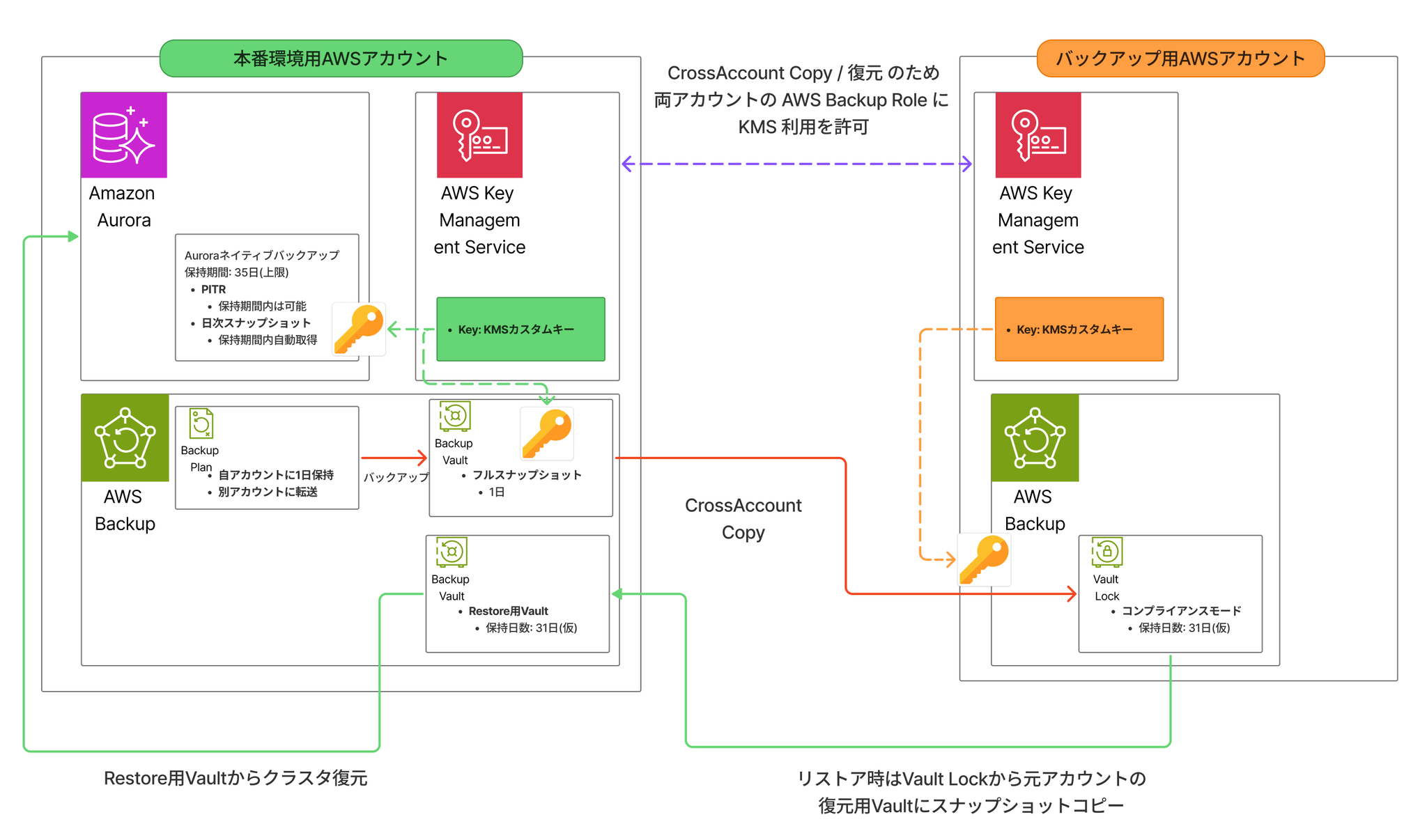
In addition to the native PITR backup feature, AWS Backup is used to maintain snapshots in a Vault within the account for production AWS accounts.
Furthermore, it is designed to copy that data to a Vault Lock in a backup AWS account.
Cost considerations
Calculating the cost of backups for Aurora MySQL is a bit complex.
| means | Billing characteristics | remarks |
|---|---|---|
| Aurora PITR | Charges are based only on incremental data usage. | It's inexpensive because it's based on incremental billing. You can extend the holding period to the maximum (35 days) to maximize the period during which you can roll back. |
| AWS Backup full backup | You will be charged for the equivalent of DB storage per generation (snapshot). | The cost increases linearly with each additional generation. |
- Since PITR is an incremental billing system, it's cost-effective to extend it to the upper limit.
- AWS Backup charges full size per generation for full backups.This is because the larger the database, the greater the cost impact, so it's a good idea to have the premise from the start that you'll review "how many generations are sufficient" based on operational results. Start with a necessary and sufficient number of generations, and adjust later.
- However, as mentioned aboveNote that in compliance mode, the retention period cannot be shortened later.
Example of cost
Estimates in the Tokyo region
| Data Type | Data volume | Cost per unit |
|---|---|---|
| DB volume size of the target cluster | 3000GB | Amazon Aurora Cluster Snapshots Warm Storage - Logical Air-Gapped Vault: USD 0.0265/GB-month |
| Daily data change volume for the target cluster | 50GB/day | Backup storage cost: USD 0.023 per GB-month |
Native backup charges are based on the daily data changes to the cluster.
50GB * 31日 * $0.023 = $35.65My impression is that it's not as expensive as I thought.
However, performing cross-account copies using AWS Backup will significantly increase costs.
If the cluster volume size is 3000GB and you want to retain 31 days' worth of daily backup copies,
The calculation is as follows:
3000GB * 31日 * $0.0265 = $2464.5This works out to the cost of a full 3000GB of storage, which adds up over 31 days.
The pricing in this area can be complicated, so be sure to check carefully.
Although not included in this calculation, please note that there will be additional transfer fees if you copy to a different region in a different account.
Restore training
In particular, you should definitely practice restoring from backups across accounts. There are many pitfalls, including with KMS, and it's common to find that restoration is actually impossible.
AlsoAccount breach scenario recoveryThe procedure involves "recovering the system by transferring it to a separate new account." The compromised production account will be isolated for forensic investigation, and the recovery will be performed using a separate account.
ThisIt would be difficult to do it on the fly after an incident occurs,Prepare a set of procedure manuals and training materials.
In conclusion
Many people probably use the default backup settings for Aurora MySQL without giving it much thought, as they usually configure them without much thought.
Let's take another look at your system and review your backup configuration!
Reference links
If you are interested in SRG, please contact us here.