
Making the Codex CLI / Gemini CLI more like the Claude Code user experience
This is Ohara (@No_oLimits) from the Service Reliability Group (SRG) of the Media Division.
#SRGThe Service Reliability Group primarily provides comprehensive support for the infrastructure surrounding our media services, focusing on improving existing services, launching new ones, and contributing to open-source software (OSS).
CyberAgent Group SRE Advent Calendar 2025This is the 20th article.
This article is an introduction to making the Codex CLI and Gemini CLI feel as close to Claude Code as possible.
IntroductionConsolidation of memory filesCheck if memory can be read.Implementation of Subagent functionalityImplementation in Codex CLIImplementation in Gemini CLIIn conclusion
Introduction
What's your favorite AI agent? I personally love using Claude Code, Codex CLI, and Gemini CLI, but I mainly use Claude Code.
Claude Code has usage limits, such as a 5-hour limit and a weekly limit. When you hit these limits, you might consider using other tools, or you might use other tools to avoid unnecessarily consuming tokens on Claude Code.
When faced with situations like this, it would be ideal if the Codex CLI and Gemini CLI could maintain as much of the "same experience" as possible, wouldn't it?
I'd like to share some tips for achieving a consistent development experience across different tools.
Consolidation of memory files
My Claude Code has several global memory files that are the culmination of years of blood, sweat, and tears, and these files basically contain instructions that are used in common no matter which project directory I'm working in. CLAUDE.md has a reference to an entry point md (LOCALRULES.md), which in turn references several memory files.
customrulesThen, move the memory file to the customrules directory and correct the path to the memory file in the entry point of CLAUDE.md.
Similarly, create symbolic links for the Codex CLI and Gemini CLI, and write the AGENTS.md and GEMINI.md files for them.
For now, I've set it up as follows.
In this way, by referencing a common directory, it becomes possible to provide the same context regardless of which agent is launched.
Check if memory can be read.
As a test, please load an issue from a certain repository in the SRG's Org. The issue itself is simply a link to a Claude Code GitHub issue.
The Cloud Code memory contains instructions to retrieve GitHub issue URLs using gh cli. The Codex CLI and Gemini CLI should also function as described above.
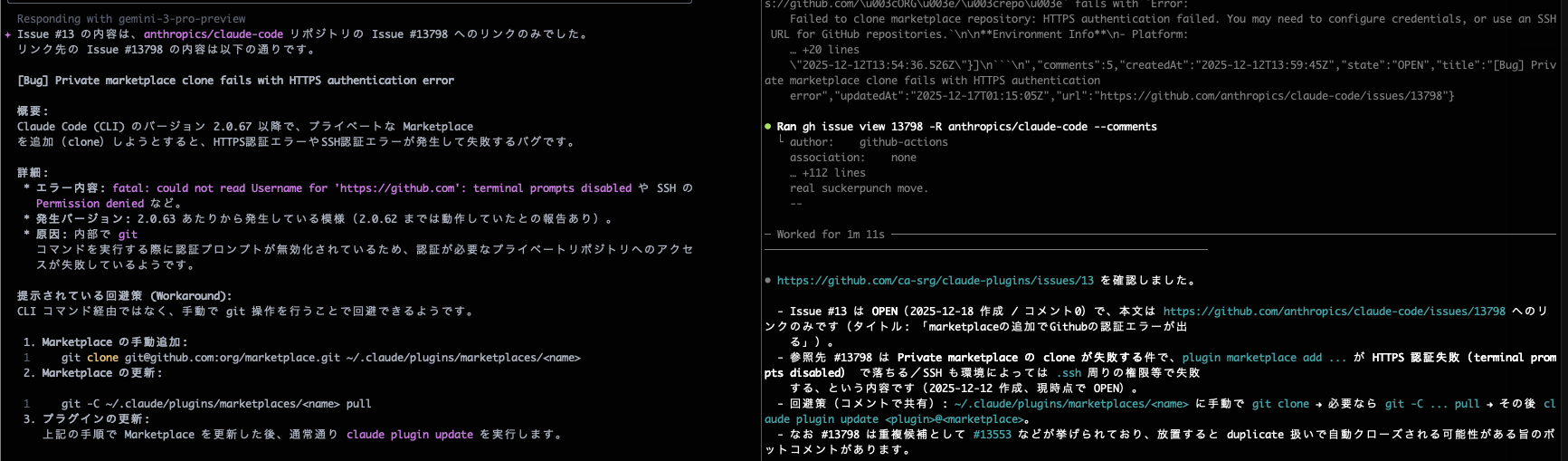
The terminal on the left is for Gemini CLI, and the one on the right is for Codex CLI.
Looking at the operation logs, I see that it's using the `gh` command for verification. That looks good.
Incidentally, before setting up shared memory, both tools responded with "Could not read because it is a private repository."
This should allow for common global memory management across the three tools.
Implementation of Subagent functionality
One of the biggest attractions of Cloud Code is its subagent feature, which allows you to extract tasks and run them in separate sessions. This feature lets you investigate and modify things without cluttering the main session's context window. It's incredibly convenient and I use it often.
To replicate this subagent functionality using the Codex CLI and Gemini CLI, we introduced a mechanism that launches a new session from the main session and allows sessions to communicate with each other.
Implementation in Codex CLI
The Codex CLI has an option that returns a response along with a prompt in the startup command. Since the skills feature was recently added, we'll describe these execution methods in skill format to implement a pseudo-subagent functionality.
Use the following command the first time you run it.
To resume the session, keep the session ID included in the initial response in the main session and resume using the following command.
skill-creatorThis skill can also be loaded using the Codex CLI.
I created the following SKILL.md file while brainstorming with skill-creator.
SKILL.md
A new session will be started to allow the skill to be recognized. Session resume will not recognize the skill, and therefore the subagent cannot be executed. Please be aware of this.
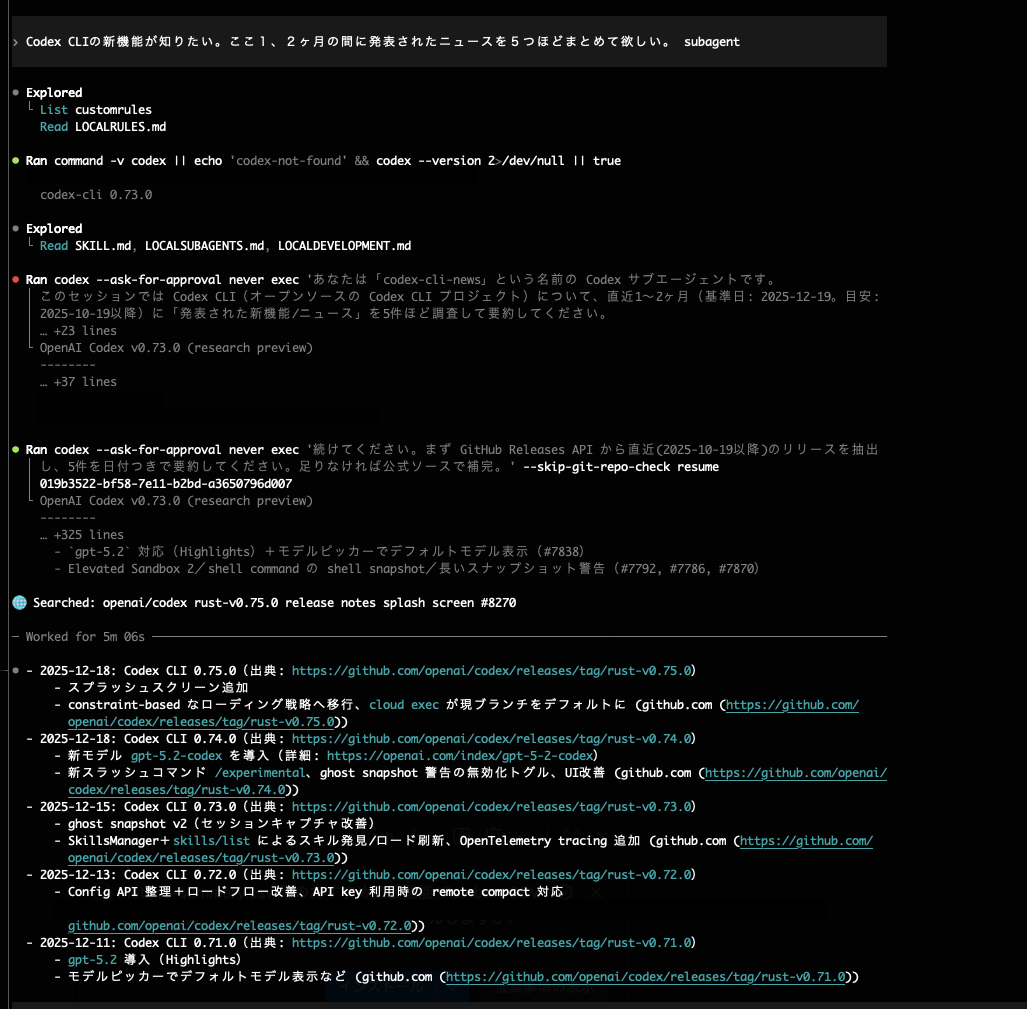
The prompt includes "subagent," indicating that it's checking the subagent's SKILL.md file. There seems to be some error when starting a new session for the subagent, but let's ignore that for now. It's using session resumption to provide a good response. Looks promising.
codex resumeImplementation in Gemini CLI
Since Gemini CLI does not have a skills feature, we will use the method of writing the procedure to global memory.
Here's how to start a session using the Gemini CLI:
When resuming, specify the session ID to continue.
GEMINI_SUBAGENT.mdAdditionally, the code contains instructions on how to run the Codex CLI subagent, so we will modify it for the Gemini CLI. Please launch the Gemini CLI and modify the session start and resume commands.
GEMINI_SUBAGENT.md
This is to verify the operation of the subagent in Gemini CLI. Let's try asking a similar question.

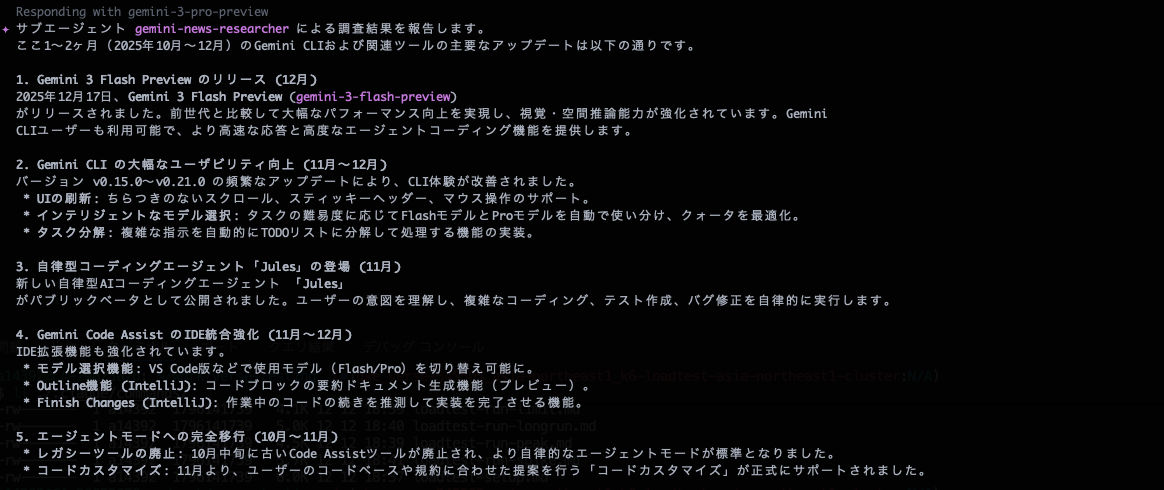
It looks good. I'll try the resume function while I'm at it.

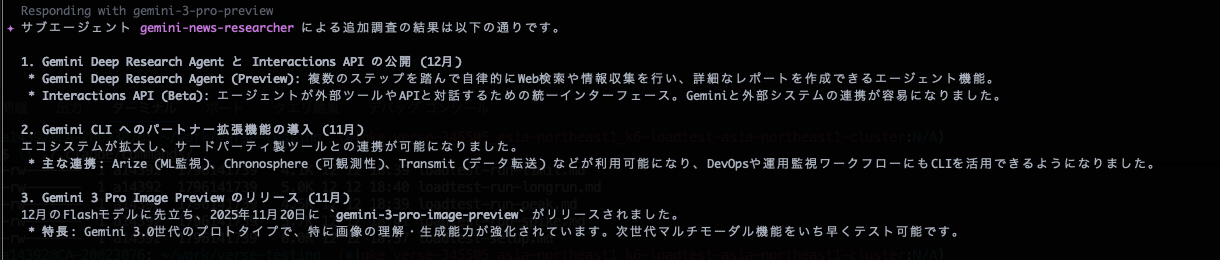
I was also able to confirm that the resume function works.
In conclusion
We've created an environment where you can work with both the Codex CLI and Gemini CLI while maintaining the familiar feel of using Claude Code.
By increasing the standardization of multiple AI tools, we can make collaborating with AI a less stressful experience.
SRG is looking for new team members.
If you are interested, please contact us here.