
Optimizing Kubernetes Pod communication with Cloudflare Zero Trust × CoreDNS
#SRGThe Service Reliability Group primarily provides comprehensive support for the infrastructure surrounding our media services, focusing on improving existing services, launching new ones, and contributing to open-source software (OSS).
This article outlines how Cloudflare Zero Trust and CoreDNS can be used to address the structural challenges inherent in "outward exposure" and "inward connectivity" of applications running on Kubernetes, incorporating practical operational perspectives.
Why is it necessary to re-examine "Pod communication" now?Overall structure organization: outward access and inward connectivityProblem ①: It's difficult to make Pods publicly accessible.Traditional Method: Strengths and Weaknesses of Ingress + ALB/GCLBLoad balancers are expensive.The question of where to place the authentication layer.Problem ②: Inbound connections for Pods are difficult.Port Forward: Convenience and Dark SideMulti-cluster/multi-account is an even bigger nightmare.Solution: Leveraging Cloudflare Zero TrustSolution for outward exposure: Access Application + TunnelExample settingsDesign considerationsComparison with ALBResolving inbound connections: Tunnel + WARP + Resolver Policy + CoreDNS1. Make the Pod/Service's IP address reachable (Tunnel + WARP)2. Enable DNS resolution of the Service FQDN (CoreDNS static IP + Resolver Policy)CoreDNS static IP addressSplit TunnelResolver PolicyMulti-cluster support: Virtual Network × FQDN with environment nameComparison with PortForward: How structurally different are they?In conclusion
Kubernetes is an incredibly powerful platform, but as you continue to use it, certain "just-right" aspects gradually become apparent.
It wasn't the kind of accident where the cluster suddenly broke down one day.
- A system that gradually increases costs without you even realizing it.
- A workflow that forces developers to perform "ritualistic" tasks.
- A configuration that easily disrupts the balance between security and convenience.
This is the kind of problem that has a subtle, gradual effect.
This article aims to address the frustrations that accumulate in daily operations by unraveling them from the network design and access control layers, and resolving them at the configuration level.
Why is it necessary to re-examine "Pod communication" now?
When you first start using Kubernetes, this will suffice for now.
- Outward-facing public access is Ingress + ALB/GCLB
- Inbound access is via kubectl port-forward
- If authentication is also required, add it using Basic Auth or OAuth2 Proxy.
These are all common structures seen in documents and blogs, and there's nothing wrong with them in themselves.
However, problems begin to appear when the number of services and clusters starts to increase.
- The number of load balancers has increased too much, and fixed costs are slowly piling up.
- Implementing authentication in development tools is difficult, resulting in a lot of reliance on Basic Auth.
- Port forwarding becomes so prevalent that it becomes impossible to tell "which terminal is connected to what."
- As multi-cluster/multi-account setups become commonplace, connecting to the development environment will become a ritual.
None of these will cause any specific function to break.
However, this gradually worsens the developer experience and blurs the lines between security and operations.
This story is about how we restructured our approach, centered around Cloudflare Zero Trust, to address the accumulated frustrations we've faced.
Overall structure organization: outward access and inward connectivity
The issues discussed in this article can be categorized into the following two types:
- The complexity of exposing Pods to the outside.
- The cost issues of load balancers
- Design problems of the authentication layer
- The hassle of connecting to a Pod inbound
- Limitations of PortForward
- Difficulty in developing in a multi-cluster/multi-account environment
This article will organize the challenges in the order of "outward-facing" → "inward-facing," and then show how we redesigned it using Cloudflare Zero Trust + CoreDNS.
Problem ①: It's difficult to make Pods publicly accessible.
Traditional Method: Strengths and Weaknesses of Ingress + ALB/GCLB
When exposing HTTP traffic to the outside world using Kubernetes, the most commonly used method is Ingress + managed load balancer (ALB/GCLB).
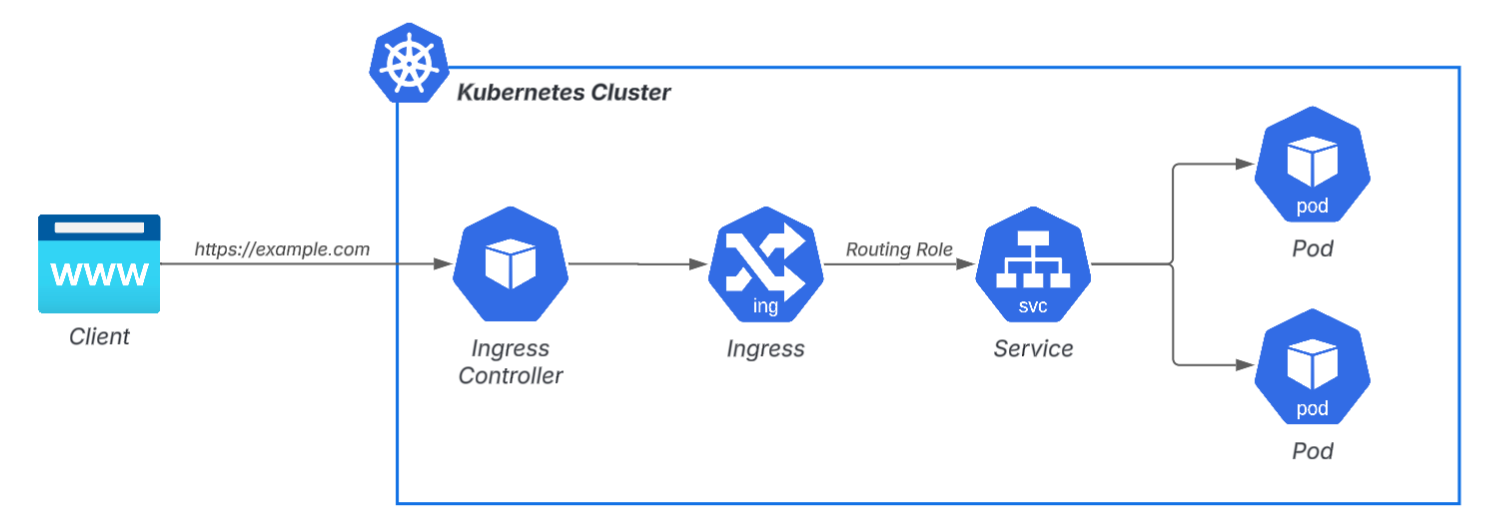
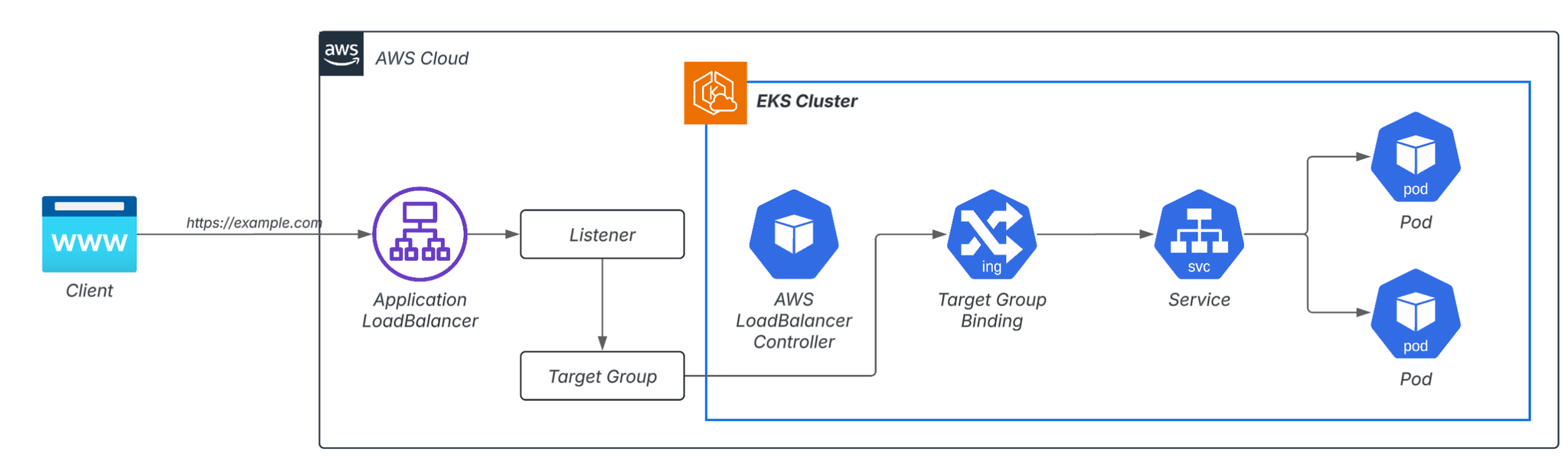
While this itself is excellent in terms of functionality and stability, the following two points begin to cause problems in the field:
Load balancers are expensive.
As the development team grows and the number of applications increases, the number of load balancers (LBs) increases at an alarming rate.
- Settings UI (Internal Tools)
- Verification app
- Metrics Dashboard
- API Staging
As you add more services you want to make public, the number of load balancers (LBs) will simply increase. If an ALB is created every time a tool is used by only a few people, it will eventually reach a scale of dozens or more across different environments. The cost of a single LB may not be large, but it is a type of fixed cost that adds up when you multiply the number of LBs.
In an attempt to save money,
- Listener Rule Aggregation
- Port Forward operation without using ALB
- Direct exposure of NodePort
While various proposals are put forward, none of them offer a fundamental solution, as they all have significant side effects on operations and user experience.
The question of where to place the authentication layer.
Another tricky issue is deciding "where to perform the authentication."
Example without an authentication layer:
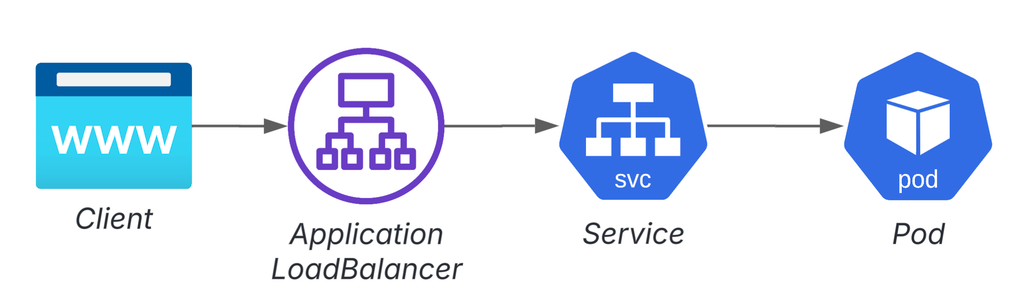
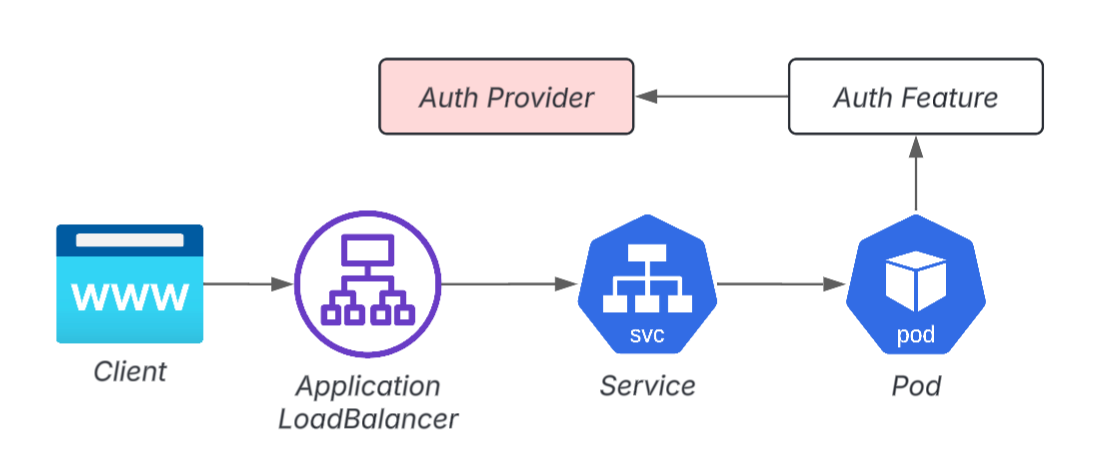
Example of where to place the authentication layer 1: App-specific authentication
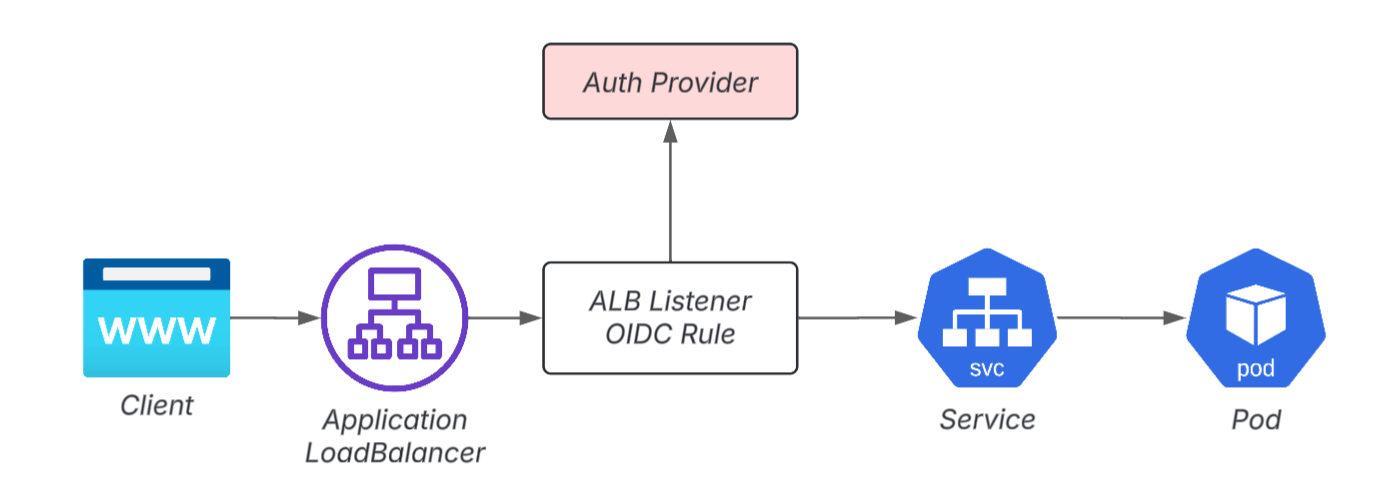
Example of where to place the authentication layer 2: In front of the Pod (ALB)
Example 3 for where to place the authentication layer: In front of the Pod (OAuth2 Proxy)
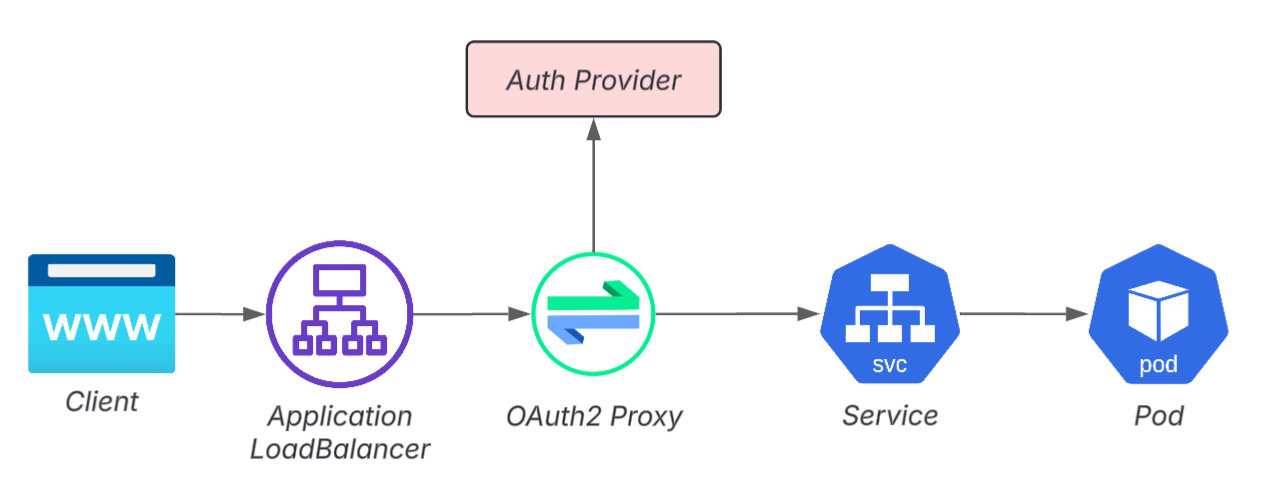
In reality, authentication in development and internal applications is extremely difficult.
- Adding authentication functionality to an app is often difficult due to technical debt considerations.
- While integrating OIDC authentication into ALB might seem convenient at first glance, it often leads to complexity in OIDC configuration, role management, and IaC (Infrastructure as Code).
- Adding OAuth2 Proxy adds another layer to the configuration.
Furthermore, in publicly available apps, users are often external partner companies, making it not uncommon to encounter environments where a unified SSO (Single Sign-On) solution is not feasible.
As a result, the use of "Basic Auth" has become widespread, and even internal applications tend to suffer from unhealthy security levels.
Problem ②: Inbound connections for Pods are difficult.
Port Forward: Convenience and Dark Side
kubectl port-forwardHowever, the moment you start overusing it, the developer's workflow begins to break down.
- The connection disappears the moment the terminal is disconnected.
- In a multi-cluster environment, maintaining multiple sessions is necessary, requiring you to keep track of which terminal is connected to which Pod.
- Using the same port number will cause conflicts, making management surprisingly difficult.
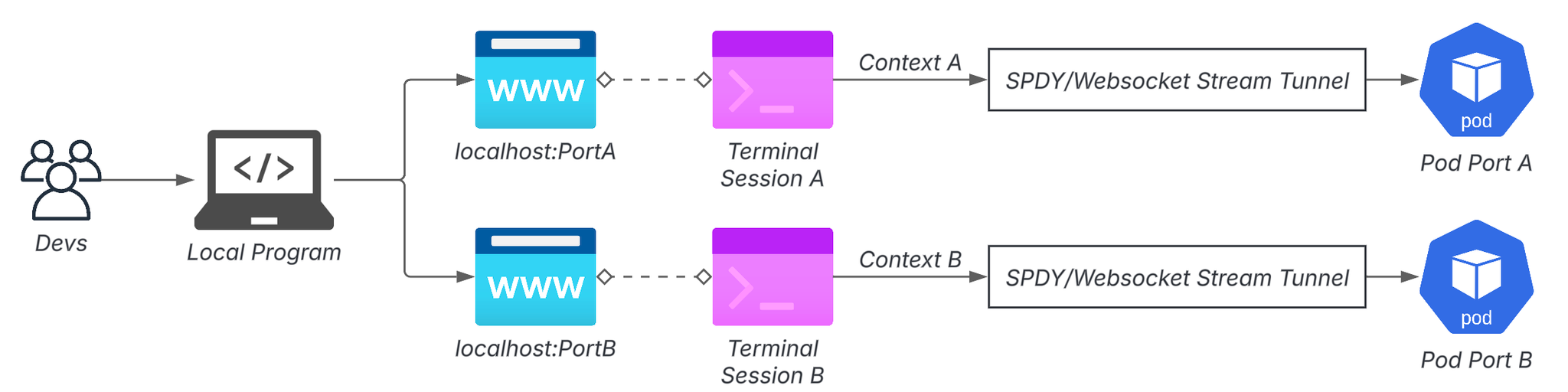
When you reach a point where you have to start by setting up multiple port forwarding connections before you even begin development, it ceases to be a tool and becomes a ritual.
Multi-cluster/multi-account is an even bigger nightmare.
As organizations grow and the number of clusters and accounts increases, the situation becomes even more complex.
- Dev/Stg/Prod are on separate clusters.
- Each product has its own separate AWS account.
- Due to SaaS integration requirements, there may be cases where "this feature is only available in Stg."
As a result, developers end up repeatedly switching VPNs, accounts, and contexts. Before they know it, they're starting network and terminal rituals before they even begin developing. When this keeps piling up, it's no wonder that some people start to feel that "local development with multiple clusters and multiple accounts is practically impossible."
Solution: Leveraging Cloudflare Zero Trust
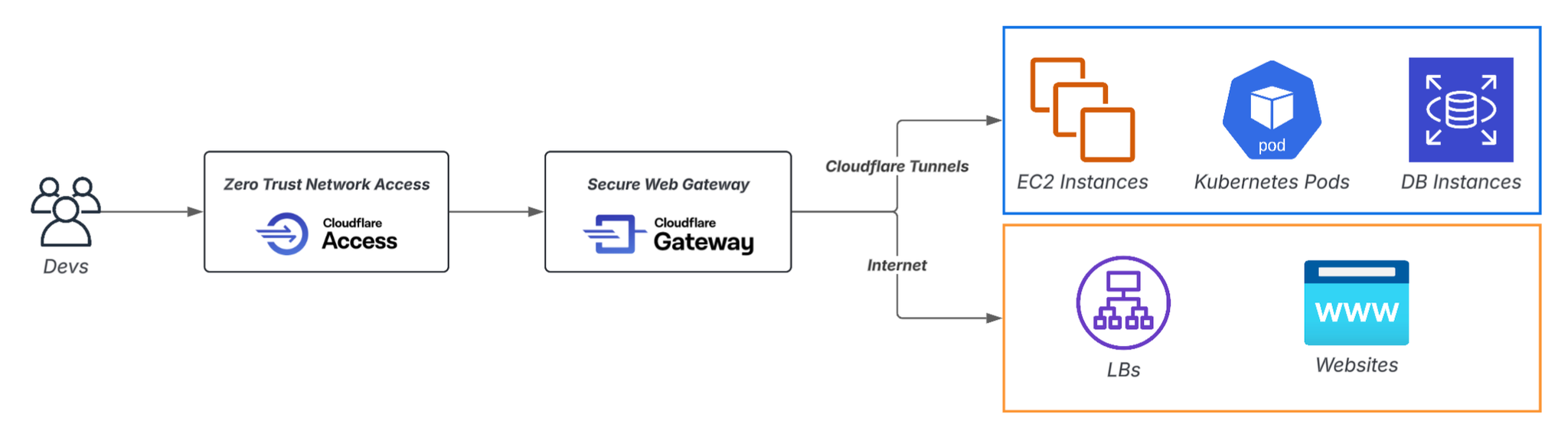
While Cloudflare Zero Trust is often discussed in terms of protecting SaaS and internal web applications, when combined with Kubernetes, it allows for a fundamental redesign of Pod communication.
The key features of Cloudflare are as follows:
- Access: Authentication + Zero Trust Access
- Access Application: A unit for performing access control on a per-DNS record basis.
- Access Policy: A policy that works in conjunction with the Access Application to perform actual access control.
- Tunnel: A mechanism that establishes a secure connection path from the internal network to Cloudflare.
- WARP: Client connecting to the Tunnel
- Gateway: Various control functions based on Secure Web Gateway
- Resolver Policy: DNS routing
- Network Policy: L4 Layer Routing
Solution for outward exposure: Access Application + Tunnel
If you configure Cloudflare Tunnel to be set up from within the cluster and protect public applications with Cloudflare Access,
- You can publish Pods without creating a load balancer.
- DNS, certificates, and authentication can be centralized on the Cloudflare side.
- Authentication methods can be separated from the app and unified.
This is one of the advantages.
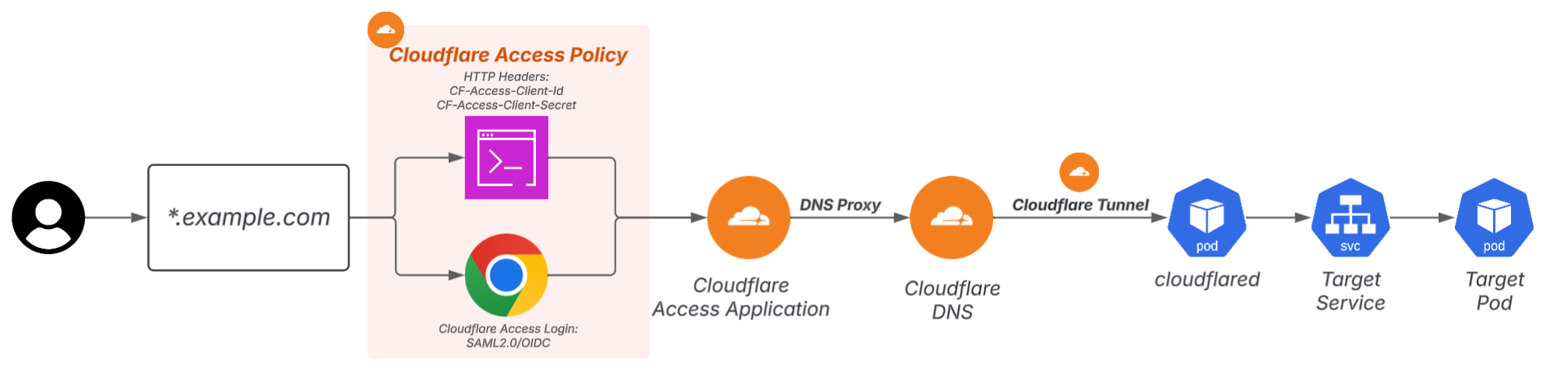
The strength of this configuration lies in the fact that "even if the number of apps you want to publish increases, the load balancer (LB) does not increase." What increases is not the ALB, but the Access Applications on Cloudflare.
Since the authentication method will also be standardized to Access, the proliferation of Basic Auth will also be stopped. In addition to Access Login for human users, specifying HTTP Headers will also work.Passing throughAn API Key method that can be used is also provided.
Example settings
For example, if you want to expose ArgoCD UI to the internet without going through ALB, you can follow these steps:
- Deploy Cloudflared to a Kubernetes cluster running ArgoCD and create a tunnel.
argocd.example.com
- Publish the ArgoCD K8s Service on the Tunnel and register the DNS Record.
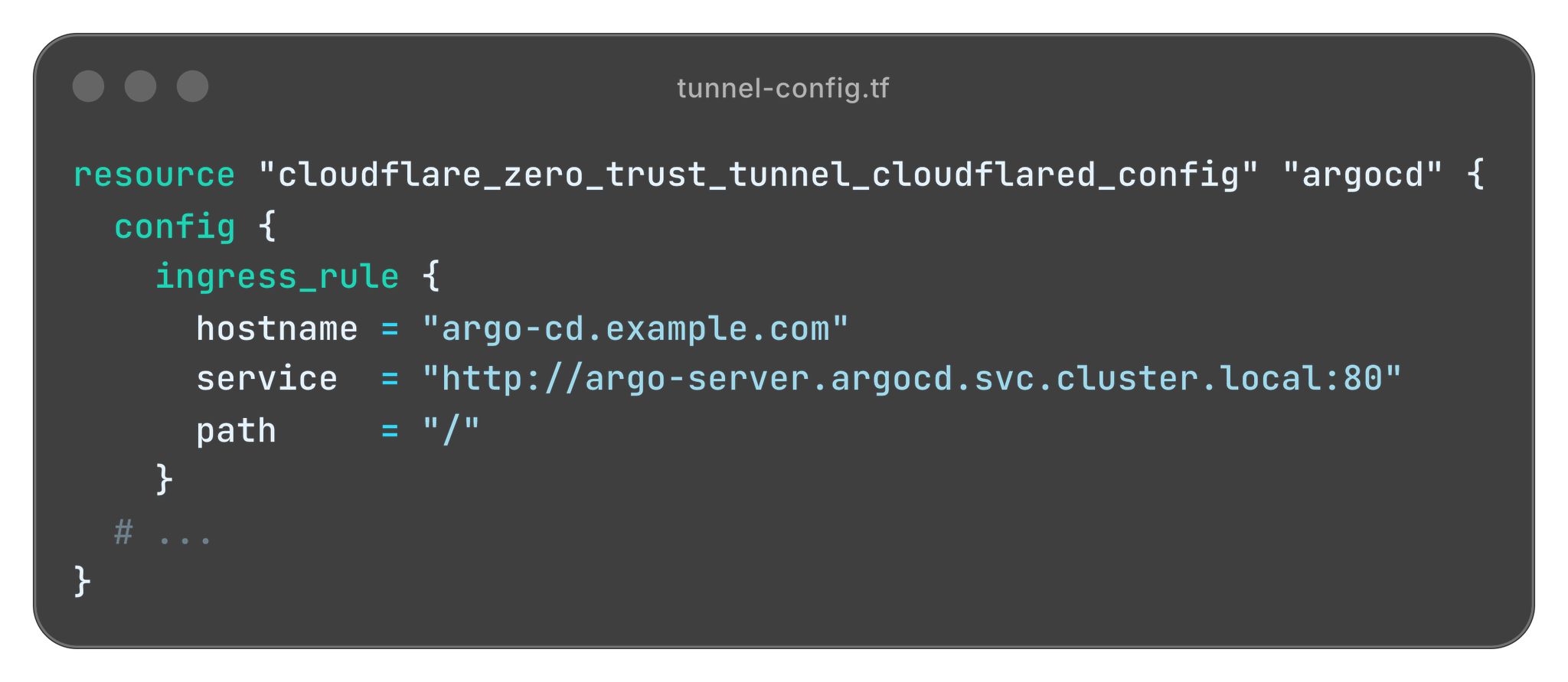
argocd.example.com
Cloudflare automatically manages TLS certificates within its DNS proxy and up to Access.
The fact that the traffic inside the tunnel (Cloudflare → cloudflared → Pod) can remain HTTP is also a major advantage, as it significantly lowers the barrier to implementing HTTPS.
Design considerations
1. Cloudflared installation location
Cloudflared must be located on a network that can reach the target Pod.
- If the connection is unreachable, communication between Cloudflare Edge and Pod will naturally not occur.
- Conversely, if you properly configure the Network Policy in Cloudflared,
"This tunnel is only accessible within this network."This also enables multi-stage network control.
2. The default state of the Tunnel is "No Authentication".
- When you open communication to the target Pod on the Tunnel, a DNS Record is created under cfargotunnel.com.There is no authentication required, and anyone can access it.That's the situation.
Access Policy → Access Application → Tunnel Config → DNS Record
Comparison with ALB
| perspective | Traditional method | Cloudflare method |
|---|---|---|
| cost | Each app requires a load balancer. | No LB required, free for up to 50 people. |
| Authentication Layer Deployment | Front stage placement required | Centralized management with Access |
| Complexity of settings | IaC at each layer | Cloudflare related IAC |
| Certificate/DNS operation | ACM/Domain Service management is required. | Cloudflare automatically manages |
Resolving inbound connections: Tunnel + WARP + Resolver Policy + CoreDNS
To overcome the limitations of port forwarding, you need to create an environment where you can directly access Pods/Services from your local machine.
The method consists of two main steps.
1. Make the Pod/Service's IP address reachable (Tunnel + WARP)
By installing WARP on the user's device and connecting the Pod network (within the VPC) to Cloudflare Edge via Cloudflare Tunnel, traffic can be routed directly to the Private IP address, similar to a VPN.

There is one important point to note here.
In AWS, Pod IPs are fine, but Service CIDRs are outside the VPC, so WARP cannot directly reach Service IPs. If you want to access Pods directly, you need to use a Headless Service.
2. Enable DNS resolution of the Service FQDN (CoreDNS static IP + Resolver Policy)
*.svc.cluster.localIn other words, if you can query CoreDNS from your local machine, the location of Pods/Services will be unified to the FQDN.
Therefore,
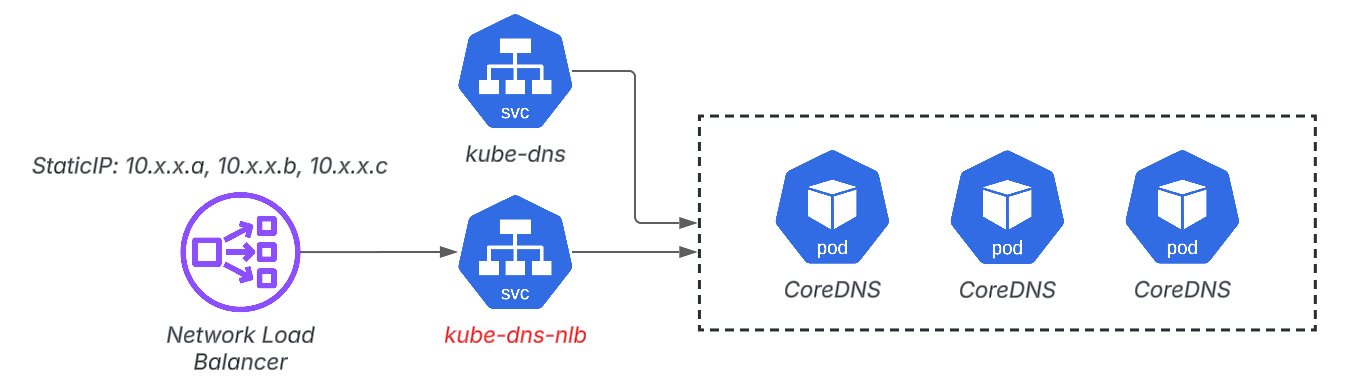
- Setting CoreDNS to a static IP address with Internal NLB
.svc.cluster.local
This is the structure we will create.
Then, the WARP ON terminal,
https://stg-app.namespace.svc.cluster.localYou can access the Pods in that cluster simply by typing the URL.
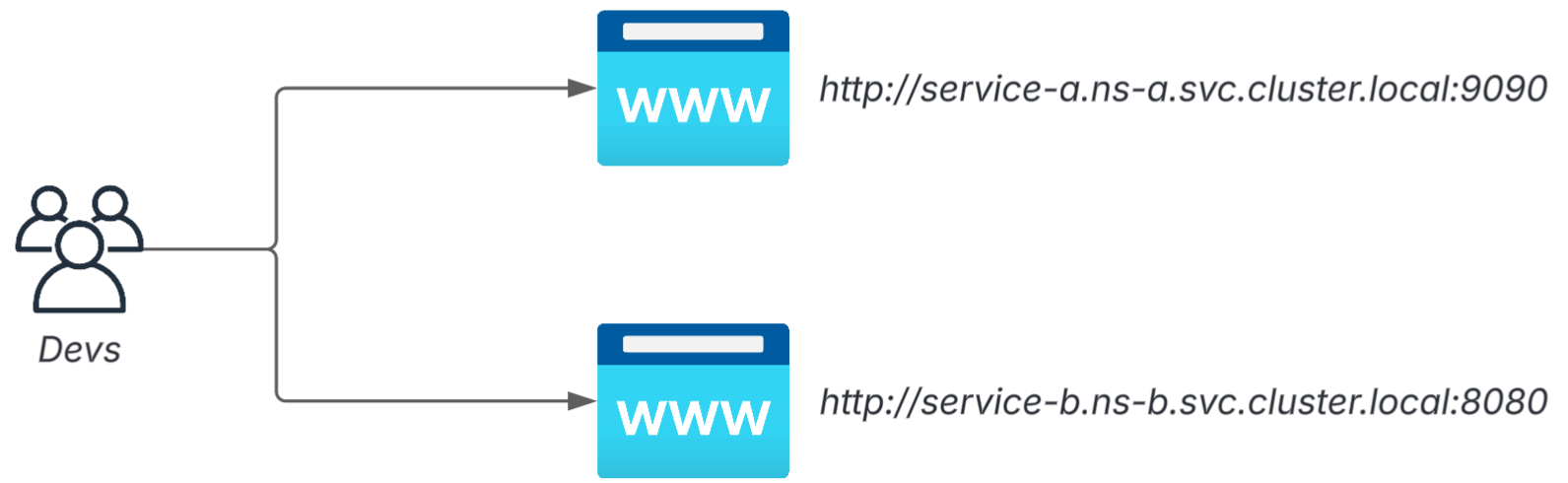
CoreDNS static IP address
Static IPUsing this,
kube-dns
kube-dns-nlb
This is the structure we will be using.
Split Tunnel
*.svc.cluster.local
*.svc.cluster.localResolver Policy
Finally, in the Cloudflare Gateway's Resolver Policy,
.svc.cluster.local
- Specify the fixed IP address of CoreDNS NLB as the NameServer.
- Forward the query as is.
We will set the following rule.
If all the elements were represented in a single sequence diagram, it would look something like this:
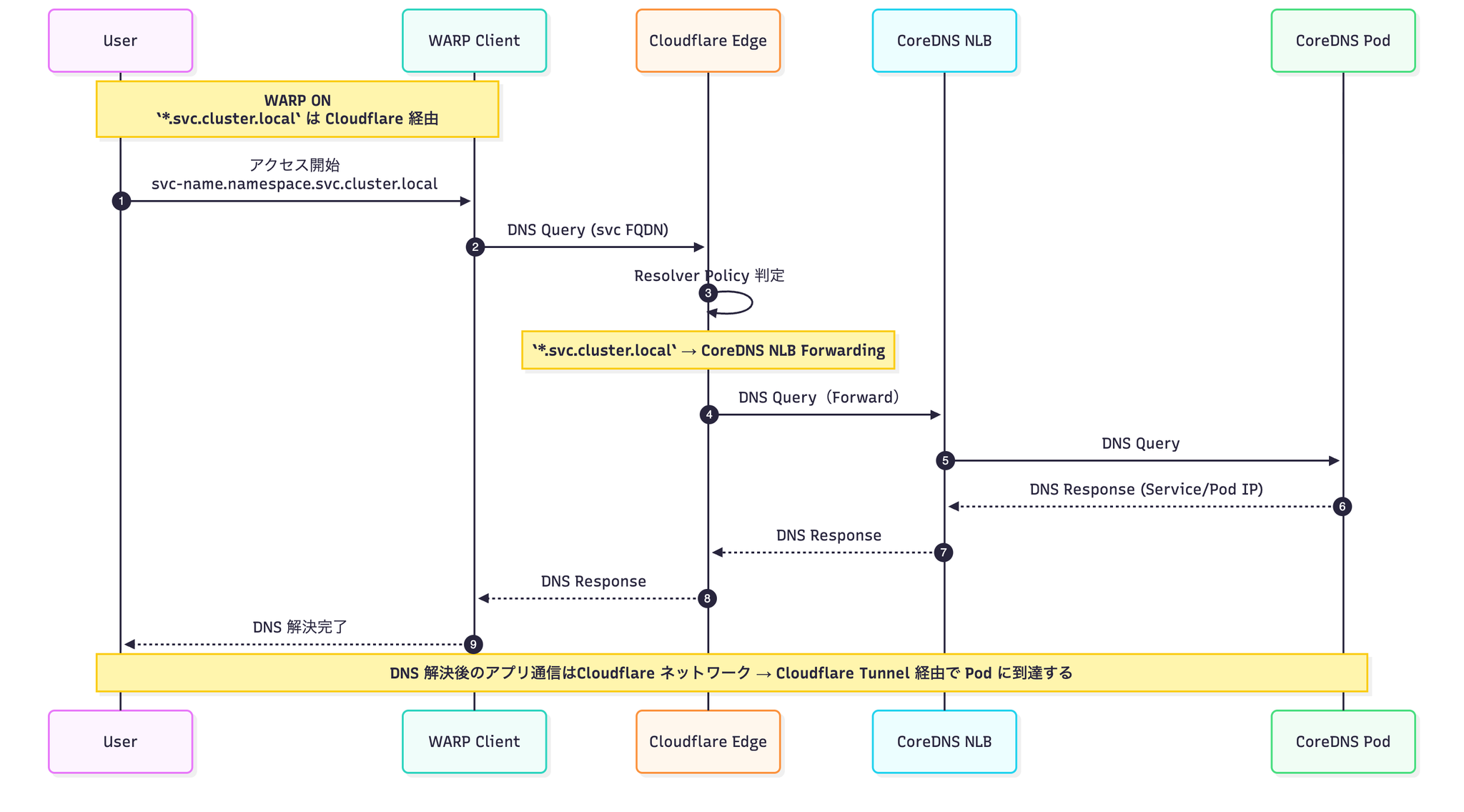
https://stg-app.namespace.svc.cluster.localMulti-cluster support: Virtual Network × FQDN with environment name
As the number of clusters increases, it becomes clearer to include "which cluster" in the URL.
example:
stg-api.platform.svc.cluster.local
prd-api.platform.svc.cluster.local
Cloudflare's Virtual Network and Resolver Policy combination allows you to route these URLs to the correct cluster's CoreDNS.
*.svc.cluster.local<env-name>-<app-name>.<namespace>.svc.cluster.local
We can flexibly handle patterns like these.
Here is an example of actual Terraform:
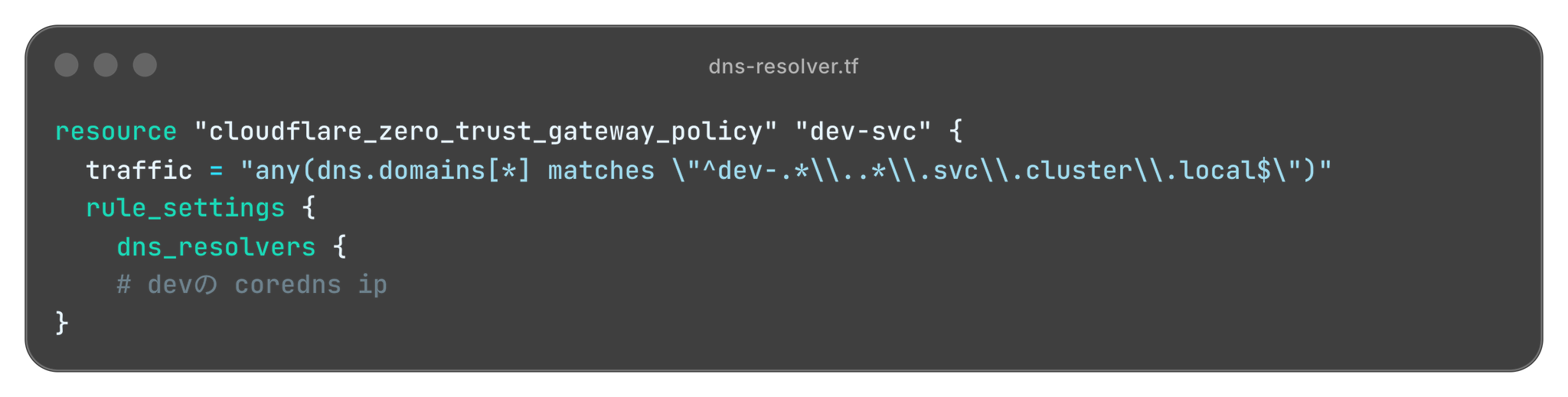
This means the rules remain the same even with multiple clusters and multiple accounts, allowing developers to switch between worlds using only the Fully Qualified Domain Name (FQDN).
Comparison with PortForward: How structurally different are they?
| perspective | Port Forward | Cloudflare Zero Trust Configuration |
|---|---|---|
| continuity | Terminal and a shared destiny | If WARP is still active, it will be stable. |
| Multi-cluster | context/terminal management hell | Unified access using FQDN |
| Development experience | Port re-pasting festival | Just type the URL |
The key is not to try to make port forwarding more convenient, but to change the configuration in a way that avoids the concept of port forwarding altogether.
In conclusion
The thing I like most about this configuration is,
We are using Cloudflare not as a CDN or DDoS protection tool, but as a "communication control platform for Kubernetes."
Zero trust is not simply a system that creates a "gateway from outside to inside the company."
- Reorganize the Pod communication patterns
- Standardize the access paths for developers.
- Consolidate authentication, authorization, and encryption into one location.
By reviewing things from this perspective, I believe we can streamline both the "outward exposure" and "inward connectivity" of Kubernetes at the configuration level.
Using Cloudflare Zero Trust in this way,
It goes beyond being a mere replacement for Ingress or VPNs, and functions as a new operational architecture option.
I hope this method will provide some helpful hints for improving your Kubernetes operations and developer experience.
If you are interested in SRG, please contact us here.