
Before creating a MongoDB Atlas cluster, be mindful of the network IP range.
This is Ohara from the Service Reliability Group (SRG) of the Media Division.
#SRGThe Service Reliability Group primarily provides comprehensive support for the infrastructure surrounding our media services, focusing on improving existing services, launching new ones, and contributing to open-source software (OSS).
This article explains the IP address contention issue in VPC peering with MongoDB Atlas and how to migrate to it while minimizing downtime.
IntroductionIP address conflict error in VPC peering configurationWhy did the IP addresses overlap?Atlas default CIDRVPC peering constraintssolution1. Delete and recreate the shared cluster.2. Remove VPC peering with competing stg instances and compromise with public access.3. Set the appropriate CIDR for the new project and migrate data from shared to shared_v2 (adopted).Data migration and VPC peering reconfiguration using Live MigrationThe importance of design
Introduction
MongoDB Atlas is a fully managed cloud database service that automates database management, allowing developers to focus on building applications. It enables secure connections using private IP addresses from cloud environments such as GCP and AWS through VPC peering.
This article explains the network IP address range conflict issue that occurred when setting up VPC peering between MongoDB Atlas and GCP, and how to resolve it.
IP address conflict error in VPC peering configuration
stgcommon vpcWhy did the IP addresses overlap?
The investigation revealed that the problem was related to the specifications used when creating the MongoDB Atlas cluster.
Atlas default CIDR
192.168.0.0/16sharedMy initial thought was to change the CIDR defined in this network container, but I discovered that, according to Atlas's specifications, changing the VPC CIDR of a cluster once it has been created requires recreating the cluster.
M10VPC peering constraints
Naturally, when VPC peering, the IP ranges of subnets must not overlap.
192.168.0.0/16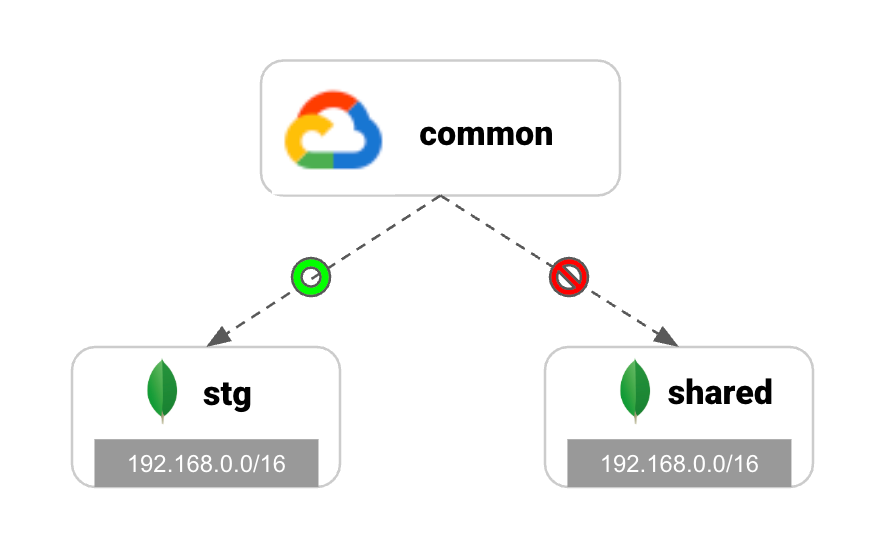
solution
We considered the following three options.
Reconfiguring the Atlas network will result in downtime, so we should consider methods that have less impact if possible.
1. Delete and recreate the cluster.
mongorestoreFurthermore, due to Atlas's specifications, existing snapshots must also be deleted when recreating, limiting the means of rapid recovery.
2. CompetingRemove the VPC peering and compromise with public access.
Access to stg is not as frequent as access to shared, and there is very little access that is critical to the product, so it was considered as a candidate.
shared3. Set the appropriate CIDR for the new project, → Transfer data (recruitment)
We will use Atlas's Live Migration feature for data migration. This feature allows us to synchronize and run two databases in parallel while the application remains running, enabling a switchover with virtually no downtime. We can also verify the suitability of the infrastructure, ensuring that CIDR changes and peering settings can be configured as expected without affecting the existing system.
We adopted this plan because we determined it was the safest and least impactful option.
Data migration and VPC peering reconfiguration using Live Migration
The specific steps for the solution we adopted are as follows:
shared_v2
172.16.0.0/18
- Check the CIDR of the new network.
common vpc
shared_v2
shared_v2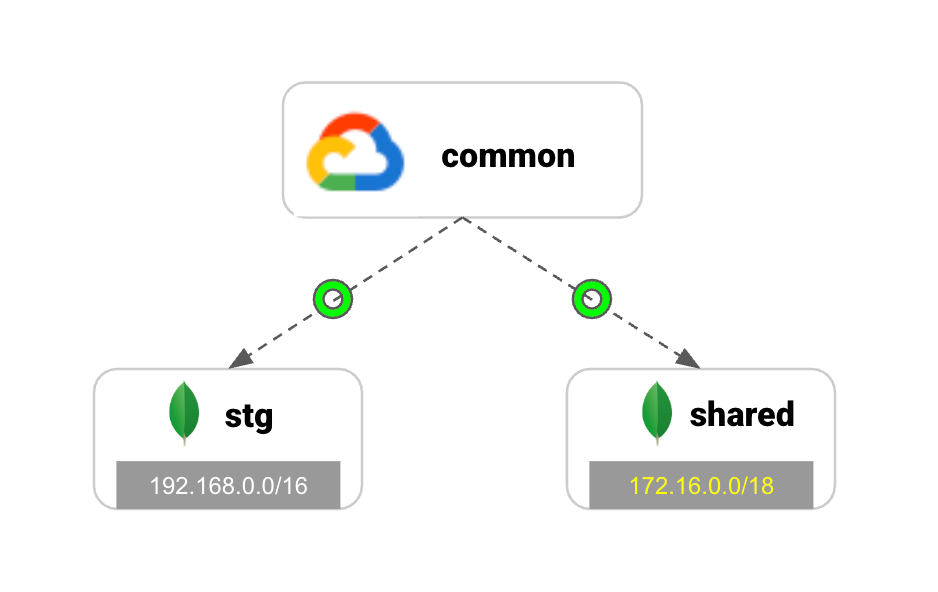
The importance of design
While managed services are very easy to set up and manage, there are many factors to consider during the design phase, such as provider-specific specifications and limitations.
Not just in network design, but by thoroughly designing during the initial stages of construction, you can prevent large-scale rework and complex data migration tasks that may occur in the future.
SRG is looking for new team members.
If you are interested, please contact us here.