

Considering Best Practices for Chaos Engineering in Google Cloud - Practical Application of Fault Injection
This is Ohara from the Service Reliability Group (SRG) of the Media Division.
#SRGThe Service Reliability Group primarily provides comprehensive support for the infrastructure surrounding our media services, focusing on improving existing services, launching new ones, and contributing to open-source software (OSS).
This article introduces practical methods for fault injection using Chaos Toolkit and LitmusChaos in Google Cloud's chaos engineering environment.
IntroductionChaos Toolkit failure testingLitmusChaos failure experimentenvironmental preparationChaosToolkit - Practical ApplicationChaosToolkit - ChallengesTask 1: Dynamic acquisition method for setting valuesTask 2: Dynamic acquisition of load balancer componentsLitmusChaos - Preparing the execution environmentLitmusChaos - PracticeLitmusChaos - ChallengeTask 1: Managing multiple experiment typesTask 2: How to execute a workflow and pass parameters.In conclusion
Introduction
Considering Best Practices for Chaos Engineering on Google Cloud - Tool SelectionThis is a continuation of the previous post.
This article introduces chaos engineering using Chaos Toolkit and LitmusChaos.
First, let's explain the types of failure experiments used in each tool.
Chaos Toolkit failure testing
We will inject a fault into the load balancer. It would be a good idea to specify parameters during the fault test to identify the scope of impact.
| Type of disability | Outage Overview | Considerations for limiting the scope of impact |
| inject_traffic_delay | Latency worsening | FQDN, Path |
| inject_traffic_faults | Error rate worsens. | FQDN, Path |
LitmusChaos failure experiment
We will inject a failure into GKE. For Pod failures, it would be good to specify the scope of impact, such as Namespace and Label. For Network failures, you can also specify IP addresses and hosts, so use these as parameters.
| Type of disability | Outage Overview | Considerations for limiting the scope of impact |
| pod-delete | Delete Pod | NS, Label |
| pod-cpu-hog | Pod CPU load | NS, Label |
| pod-memory-hog | Pod memory load | NS, Label |
| pod-network-latency | Pod NW latency worsening | NS, Label, Destination IP, Host |
| pod-network-loss | Pod NW error rate worsening | NS, Label, Destination IP, Host |
| node-restart | GKE Node restart | AZ, Label |
| node-cpu-hog | GKE Node CPU load | AZ, Label |
| node-memory-hog | GKE Node Memory Load | AZ, Label |
environmental preparation
Let's set up the following tools that we'll be using.
- gcloud
- helm
- argo cli
- Python
- chaostoolkit
- chaostoolkit-google-cloud-platform
ChaosToolkit - Practical Application
Experiment definitions are managed in JSON format.
The following is a sample for testing load balancer (LB) error rate deterioration failures. This experiment rewrites the Route rules definition of the LB's URL Map resource. You can define the settings in Configuration or retrieve them from environment variables. As will be explained in more detail below, it is also possible to dynamically retrieve values and use them as settings.
There are three (or four) important components.
- configuration
- Define the setting value as a variable.
- method
- Definition of the execution part of fault injection (multiple options can be specified)
- rollbacks
- Definitions for restoring to the original state after the execution time for fault injection has elapsed (multiple definitions are possible)
- steady-state-hypothesis
- Definitions to verify that the target is functioning correctly.
- option
I will run this experiment (I'm running it via uv because it's package-managed with uv).
--var-filechaostoolkit.logThe latency degradation exercise can also be implemented by defining it in almost the same way.
ChaosToolkit - Challenges
This section describes the challenges encountered during the implementation of the experiment and how they were resolved.
Task 1: Dynamic acquisition method for setting values
Regarding how to dynamically set values in the definition file, while I thought that using a template engine would allow for variable expansion in combination with processing outside of ChaosToolkit, I wanted to avoid significantly compromising the readability of the JSON, so I explored methods for dynamic retrieval using Chaos Toolkit's own functions.
Therefore, I used the variable substitution function of ChaosToolkit.
Here is an excerpt of the definition.
get-url-map-target-name-probeThis made it possible to automatically configure experimental settings according to the environment, reducing the effort required to manage multiple configuration files for each environment.
Task 2: Dynamic acquisition of load balancer components
When performing fault injection experiments on a load balancer, it was necessary to specify the target URL map name and Path matcher name in the experiment definition.
These names are often automatically generated resource names by Google Cloud, making manual identification time-consuming and prone to human error.
actions/url_map_info.pyThe definition file extracted in the previous assignment 1 contains the settings necessary to run the script.
The necessary information is dynamically retrieved by processing it in the script as follows:
- DNS resolution from the entered domain name to the IP address
- Retrieve information associated with Frontend from the acquired IP address.
- Analyze the information and retrieve the necessary URL map resources.
- Get the URL map name and path matcher name.
This means that when running failure tests, you only need to specify the domain name, and you don't have to worry about complex resource names.
LitmusChaos - Preparing the execution environment
Before we begin, let's explain the execution environment for LitmusChaos, which we briefly touched upon in the tool selection section. Litmus has two types: Control Plane and Execution Plane. Strictly speaking, the final execution environment only requires the Execution Plane, but we will explain it while building the entire system.
We will deploy the Control Plane using Helm.
Since we're deploying only the bare minimum components, we'll adjust the parameters in values.yaml.
values.yaml
The frontend is a component of the WebUI.
Access the frontend using the configured username/password and deploy the Execution Plane as described in the following documentation.
Download the manifest and run `kubectl apply`.
This completes the setup of the Litmus execution environment.
LitmusChaos - Practice
From here, we will explain and demonstrate the mechanism for actually injecting the disruption.
The following sequence diagram shows that the deployment of a Chaos Workflow custom resource triggers the fault injection process.
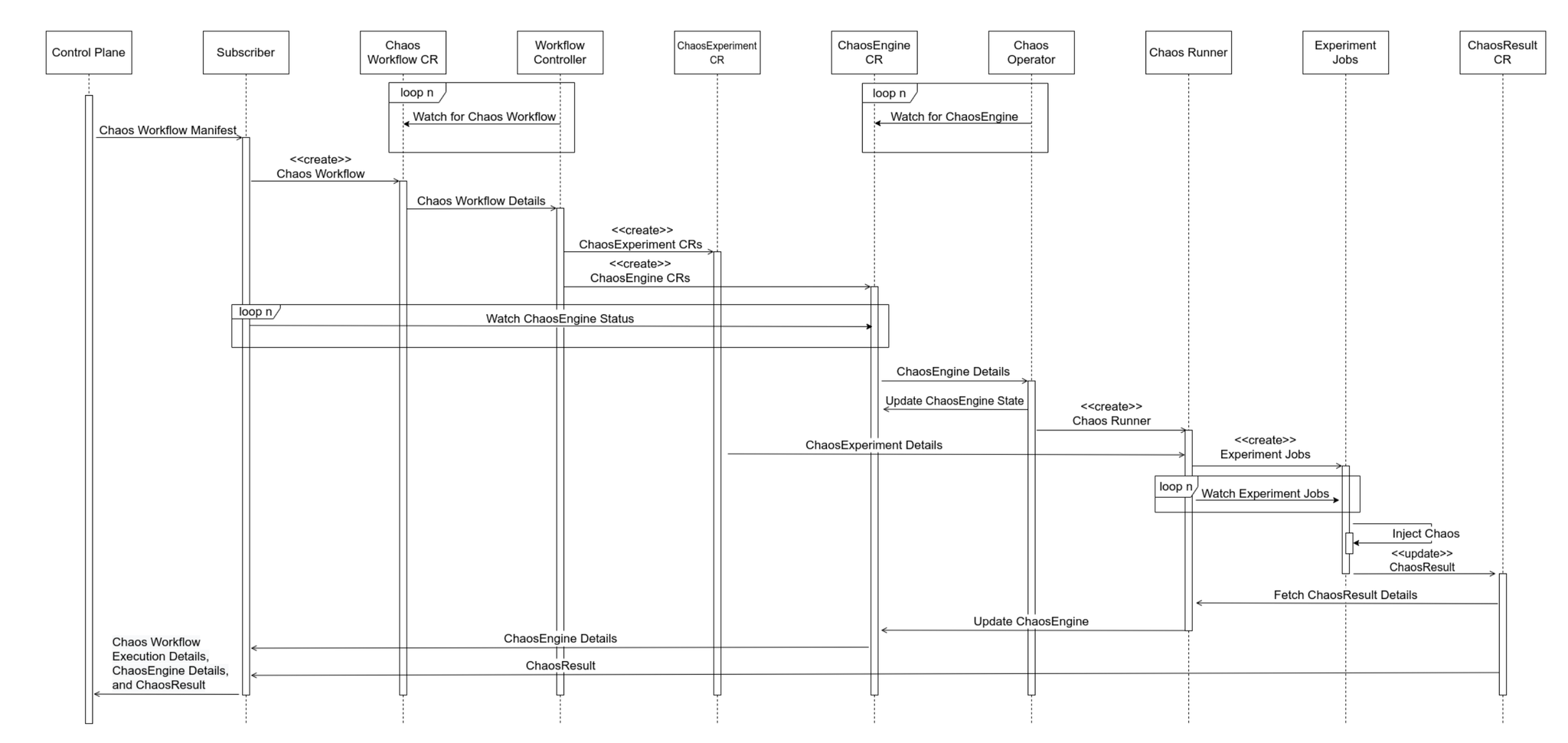
The workflow is written in Argo Workflow format and involves defining and applying two types of custom resources.
- Chaos Workflow CR
- ChaosExperiment CR
- ChaosEngine CR
Sample workflow: pod-delete
This workflow was created simply by selecting the "Add Experiment > pod-delete" template from the WebUI. After creation, download the manifest.
Let's try running the above workflow. This time, we'll perform a failure test by deleting chaos-exporter, which is not needed. Incidentally, this workflow has an ID specific to the Litmus execution environment, so it won't work in other environments if you simply copy and paste it. Please apply the workflow you created in your own environment.
When you apply the workflow, you'll see that three custom resources are created and multiple Pods are running. If something isn't working correctly for any reason, check the status of these resources.
CompletedThis is the advanced section.
I introduced the fault test items to be performed with LitmusChaos at the beginning, and now we will implement the workflow to inject these faults. I implemented it in a single workflow. Splitting the workflow into files could lead to repeating similar processes, so I combined them into one. The YAML file is quite large, so I will explain it with a flowchart like this.
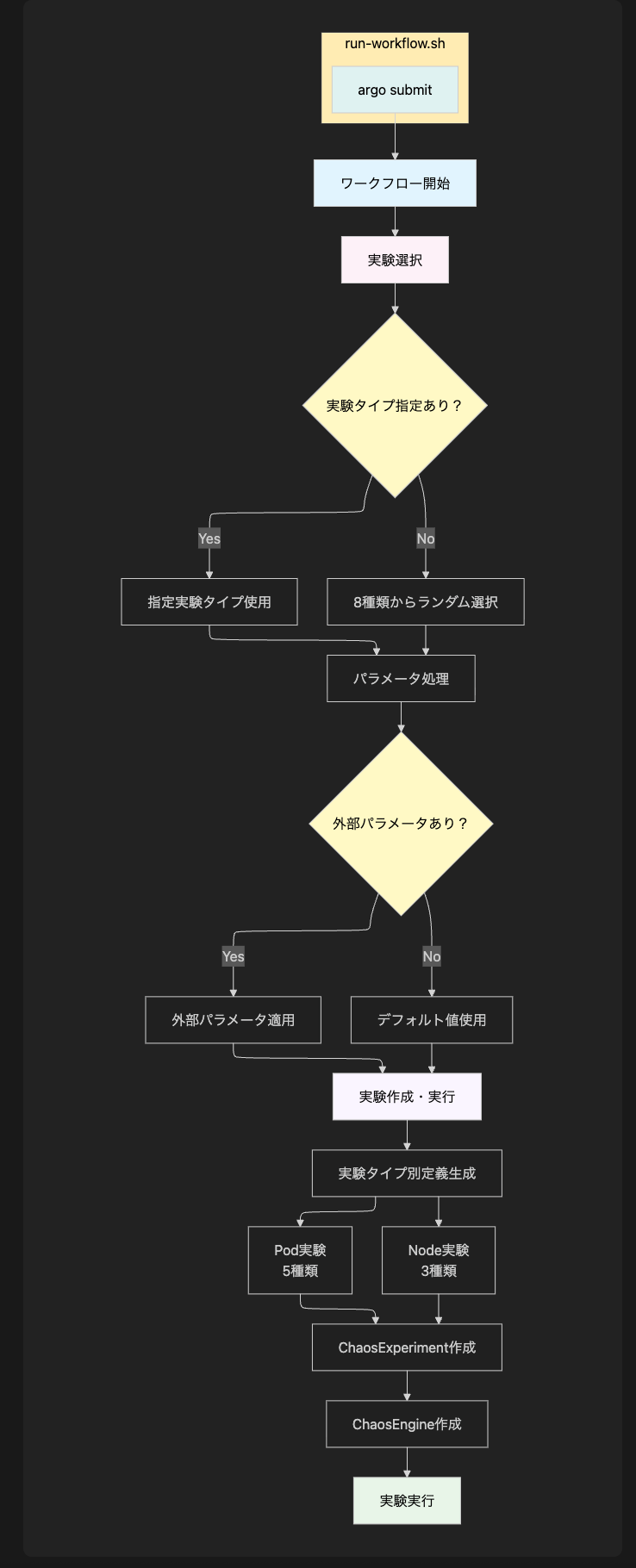
--waitLitmusChaos - Challenge
Task 1: Managing multiple experiment types
run-workflow.shTask 2: How to execute a workflow and pass parameters.
Originally, executing workflows via scripts was quite inefficient because it involved internally implementing parameter substitution for the workflow using the sed command, deployment using kubectl apply, and waiting during workflow execution.
- A complex workflow involving rewriting a template file, running `kubectl apply`, waiting for execution to complete, and then manually checking the results.
- Since YAML format is not considered, there is a risk of string substitution errors.
- Template file conflicts during concurrent execution
Due to various issues, I switched to workflow control using the Argo CLI. As a result, writing scripts and workflows has become much simpler.
In conclusion
This article presented practical examples of chaos engineering using two tools, ChaosToolkit and LitmusChaos, and introduced specific solutions to the challenges encountered during the process.
Beyond simply introducing tools, continuously improving operational challenges through script development, parameter optimization, and configuration management reduces human error, enabling safer and more reproducible chaos engineering practices.
ChaosToolkit excels at flexible experiment definition through declarative descriptions, while LitmusChaos boasts Kubernetes-native integration and a rich set of experiments.
We hope these examples will be helpful to those who are about to embark on chaos engineering and aim to improve system reliability.
If you are interested in SRG, please contact us here.