

"tosage" visualizes how much AI is being used within a team.
#SRGThe Service Reliability Group primarily provides comprehensive support for the infrastructure surrounding our media services, focusing on improving existing services, launching new ones, and contributing to open-source software (OSS).
This article introduces "tosage," an open-source software that visualizes a team's use of AI tools, and aims to support data-driven productivity improvement and cost management.
Introduction
In recent years, AI-powered development support tools such as Cursor, Vertex AI, and Amazon Bedrock have rapidly gained popularity and are being used in many development environments.
While these tools have the potential to dramatically improve developers' productivity, they also present a new challenge: it's difficult to accurately track "which AI tools" are being used and "to what extent" within teams and departments.
Therefore, to solve this problem, we developed "tosage," a tool that makes it easy to visualize a team's AI usage.
What is tosage?
tosage is a daemon-resident application that collects usage data (token amounts) for major AI development tools and sends it to Prometheus, a monitoring system.
It runs continuously in the background, aggregating usage data for each tool.
Supported Services
Currently, tosage supports token volume collection for the following services:
- Cursor
- Claude Code
- Google Cloud Vertex AI
- Amazon Bedrock
You can centrally manage the usage data collected from these tools.
Simple architecture
A key feature of tosage is its simple architecture.
Generally, an intermediate component called PushGateway is used when sending metrics for short-lived jobs to Prometheus, but tosage does not require this.
The system employs a mechanism where a locally running daemon directly sends metrics to the Prometheus Remote Write endpoint.
This enables near real-time data collection without complicating the monitoring system configuration.
Simple visualization with Grafana
The data collected by tosage is intended to be visualized on a dashboard using Grafana.
We also provide ready-to-use Grafana dashboard templates so you can intuitively grasp usage patterns.
This dashboard allows you to see usage and trends for each user and AI model at a glance, enabling data-driven analysis.
Easy to implement
You can install it using only the following command.
tosage sends metrics to Prometheus.
If you don't have a Prometheus environment, we recommend using Grafana Cloud.
Grafana Cloud offers a free plan that is sufficient for use by individuals and small teams.
By combining tosage with the free Grafana Cloud plan, you can quickly build an environment for visualizing AI usage without incurring additional infrastructure costs. (not PR)
privacy
The metric labels that are sent will have the host (hostname) appended to them.
However, if a hostname could potentially identify an individual, you can specify a host label of your choice in the settings.
Usage by our team on a particular day
Today was a day for team working group meetings, and it was interesting to see the different approaches people took, with some using Cursor, others Claude Code, Bedrock, and so on.
It appears they used 200 million tokens on that day.
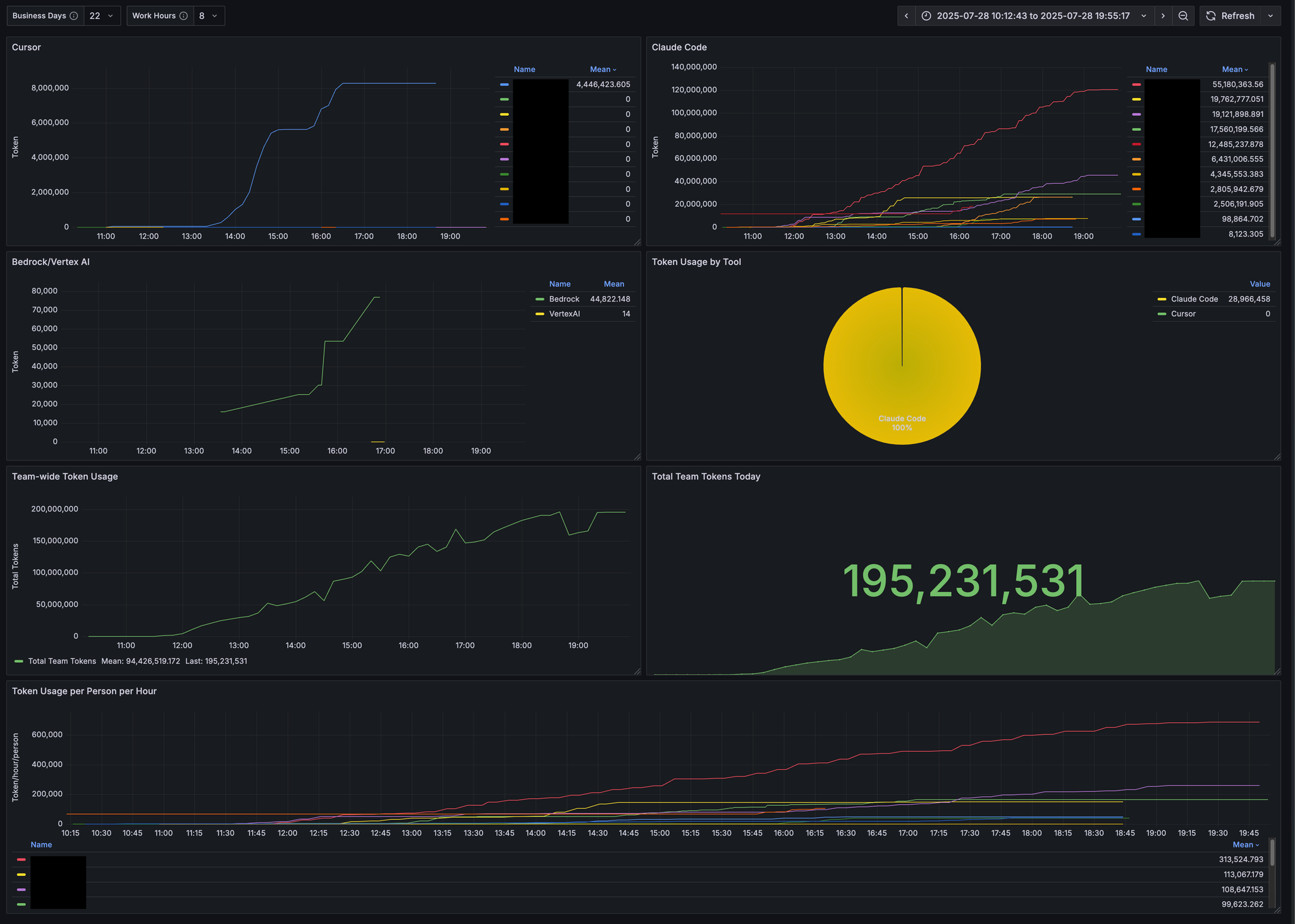
I've signed a contract for an AI tool at my company, but I think this could be useful for reviewing whether it's actually being used and for reconsidering the contract.
summary
This article introduced "tosage," a tool that visualizes a team's AI usage.
All 15,000 lines of code in this tosage were created using vibe coding.
By implementing tosage, you can use data to determine which AI tools are contributing to improving your team's productivity and use that information to help with future cost management.
Tosage is open source, so we hope it will be useful for many development teams that are actively using AI tools.
We welcome AI-powered PRs, including bug reports and feature suggestions.
SRG is looking for new team members.
If you are interested, please contact us here.