

Which managed Valkey service should you choose? AWS (ElastiCache/MemoryDB) vs Google Cloud (Memorystore)
This is Kobayashi (@berlinbytes) from the Service Reliability Group (SRG) of the Media Division.
#SRGThe Service Reliability Group primarily provides comprehensive support for the infrastructure surrounding our media services, focusing on improving existing services, launching new ones, and contributing to open-source software (OSS).
This article examines the differences between Valkey managed services, highlighting their features and how to choose the right one for each, based on benchmark results.
IntroductionLoad test preparationThe instance that applies the loadValkey, the side that is subjected to the loadTesting methodLoad test resultsinstanceValkey 7.2Valkey8.0ConsiderationpriceIn conclusion
Introduction
Our company provides services on multiple public clouds, including private clouds.
When developing a new service, selecting a main platform is easier if it offers features that can only be achieved on that platform.
However, nowadays, most companies offer the features you want.
In this situation, the next important factor becomes the balance between cost and performance.
This time, I'd like to examine the differences between Valkey, which was forked from Redis in 2024 due to restrictions on commercial use, and other services, focusing on the differences between the platform and the service itself.
In comparison to Valkey, it is a managed service.
- Amazon ElastiCache for Valkey
- Amazon MemoryDB for Valkey
- Google Cloud Memorystore for Valkey
I would like to focus on that.
AWS offers two main database services: ElastiCache, optimized for caching in front of other databases, and MemoryDB, which offers enhanced availability and persistence and can be used as a single primary database. Both utilize the Valkey engine, but there appear to be differences in the available versions: ElastiCache supports versions 7.2/8.0, while MemoryDB supports versions 7.2/7.3. (As of April 2025)
Google Cloud achieves functionality equivalent to AWS through a single Memorystore service, by allowing users to adjust the number of shards, replicas, and tiers.
Valkey Engine (7.2/8.0) is also available here.
Also, since we have the opportunity, we'll apply load using the latest Arm instances and briefly compare their benchmark results.
Load test preparation
The instance that applies the load
Recently, the use of cost-effective Arm-based Graviton processors has become common in AWS.
Currently, the latest Graviton 4 processor is available as the 8g generation.
Additionally, Google Cloud has made C4A machine type instances, powered by Arm-based Axion processors, generally available (GA) since October 2024.
On the Google Cloud side, we'll try using the Axion processor, which should be available in the Tokyo region from around the end of March 2025.
And on the AWS side, we'll try using the Graviton 4 processor, which is based on the same Arm Neoverse-V2 design as the Axion.
Instance sizes and machine types are the same for both AWS and Google Cloud, and the series is determined by the vCPU-to-memory ratio.
A simple table would look like this:
| vCPU : Memory | AWS | Google Cloud |
| 1 : 2 | Compute Optimized c8g | highcpu c4a-highcpu |
| 1 : 4 | General Purpose m8g | standard c4a-standard |
| 1 : 8 | Memory Optimized r8g | highmem c4a-highmem |
This time, I'd like to use a balanced 1:4 ratio with a 2-core vCPU.
| provider | AWS | Google Cloud |
| Instance type | m8g.large | c4a-standard-2 |
| CPU Core Count | 2core | 2core |
| memory | 8.0 GiB | 8.0 GB |
Valkey, the side that is subjected to the load
AWS does not yet have any regions where 8g generation node types can be selected, and Google Cloud does not appear to have published the CPU generation of its node types. Therefore, we will compare both by matching the specifications with the same number of vCPUs and amount of memory.
This time, we will compare a configuration with 2 vCPU cores and 13 GB of memory.
I plan to compare Valkey versions 7.2/8.0 with ElastiCache, MemoryDB version 7.2, and MemoryStore versions 7.2/8.0.
I'd like to do another test once MemoryDB version 8.0 becomes available.
In summary, it is as follows:
| provider | AWS | AWS | Google Cloud |
| service | ElastiCache for Valkey | MemoryDB for Valkey | Memorystore for Valkey |
| Instance type | cache.r7g.large | db.r7g.large | highmem-medium |
| CPU Core Count | 2core | 2core | 2vCPU |
| memory | 13.07 GiB | 13.07 GiB | 13 GB |
| Region/Zone | Single Region | Single Region | Single Zone |
| Number of shards | 1 | 1 | 1 |
| replica | none | none | none |
| engine | Valkey 7.2 / 8.0 | Valkey 7.2 | Valkey 7.2 / 8.0 |
Testing method
- First, to get a rough idea of the processing power of the instance that will be subjected to the load,CoreMarkIt measures the score. CoreMark is a commonly used metric for evaluating the performance of a standalone CPU.HereVarious CPU scores are available.
CoreMark parameters
- Next, we populate a managed Valkey instance with about 30-40% of the data. This is because few services operate with an empty instance, and running benchmarks from a completely empty state tends to yield better results, so we want to obtain benchmark results that are more in line with actual operation.
- Next, within each public cloud, we start from instances that are applying the load in the same region and the same zone.memtier_benchmarkWe will perform a benchmark test.
- We will apply a load to the system for 3 minutes each, for a total of 5 sets, using three different workloads: Write Only, Read Only, and Read:Write=1:1.
memtier_benchmark parameters
write
reading
Mixed reading and writing
- We will compare the average number of operations per second and P99 latency for each of the five sets.
Load test results
instance
| provider | AWS | Google Cloud |
| Instance type | m8g.large | c4a-standard-2 |
| CPU | AWS Graviton4 Processor | Google Axion Processor |
| Arm IP | Arm Neoverse-V2 | Arm Neoverse-V2 |
| OS | Ubuntu 24.04.2 LTS | Ubuntu 24.04.2 LTS |
| Coremark score | 57405 | 61439 |
The Graviton 4 appears to have achieved the highest score among the Graviton series, which is highly regarded for its performance-to-price ratio.
Regarding the Axion, it seems to offer a performance improvement of over 40% compared to instances of the same 4th generation Intel processors.
While there is almost no difference in on-demand pricing between the two, the Axion shows about 7% higher performance.
Although neither has officially stated this, it is thought to be within the range of clock speed differences reported on several websites.
(Graviton 4 2.7-2.8GHz, Axion 3.0GHz?)
Valkey 7.2
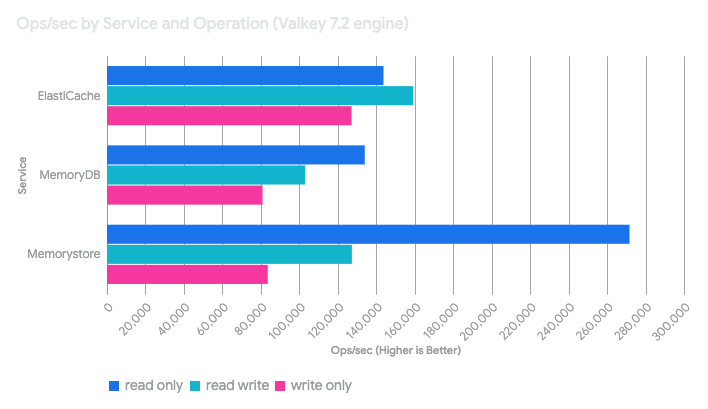
Here are the results for three different workloads (Write Only / Read Only / Read:Write=1:1) using the Valkey 7.2 engine.

Valkey8.0
And here are the results using the Valkey 8.0 engine.


Consideration
First, in a comparison using the Valkey 7.2 engine, Memorystore demonstrated outstanding read performance compared to other services.
However, write performance did not show a similar trend, suggesting that Memorystore is tuned to prioritize read operations over write or mixed read/write patterns. This makes it ideal for services where extremely read-heavy caching is expected.
ElastiCache performed well in all patterns, particularly excelling in mixed read/write patterns and p99 latency.
This can be described as the most balanced.
This performance is highly versatile and seems to reflect the original design goals of the caching layer, such as session management where both reads and writes occur, and caching of frequently accessed data.
On the other hand, MemoryDB appears to be inferior to the other two in terms of read/write performance and latency. However, this is likely due to its fundamental design philosophy.
MemoryDB is in a different category than caches like ElastiCache or Memorystore; it's a durable primary database.
It achieves durability through Multi-AZ transaction logging, a feature not found in other services, eliminating the need for a separate cache + database layer—a seemingly intended trade-off.
In comparisons using the Valkey 8.0 engine, ElastiCache showed a slight improvement in write performance, but no significant performance improvement was observed.
Memorystore, on the other hand, saw an increase of approximately 5% in Ops/sec across all workloads, and P99 latency also improved.
The tendency to prioritize read operations remains unchanged.
Therefore, upgrading the engine version did not necessarily translate to a simple performance improvement.
When assessing the impact on performance, testing in actual workflows and environments may be essential.
price
Finally, let's talk about cost.
Comparing the cost differences per node used in this study, based on on-demand pricing in the Tokyo region,
MemoryDB appears to be approximately 25% more expensive than ElastiCache.
MemoryStore is approximately 17-20% more expensive than ElastiCache, and 5-11% cheaper than MemoryDB.
| provider | AWS | AWS | Google Cloud |
| service | ElastiCache for Valkey | MemoryDB for Valkey | Memorystore for Valkey |
| Instance type | cache.r7g.large | db.r7g.large | highmem-medium |
| On-demand pricing (per hour) | $0.2104 | $0.2597 | $0.247 |
| On-demand pricing (monthly) | $151.488 | $186.984 | $177.84 |
| Region/Zone | ap-northeast-1 | ap-northeast-1 | asia-northeast1 |
In addition to instance fees, ElastiCache also charges,
- When using data tiering, the price
- Network charges (for cross-AZ and cross-region communication only)
- Backup fees (if you use backups)
In MemoryDB, in addition to instance fees,
- When using data tiering, the price
- If there are more than 10TB/month of writes, then the following will apply to writes exceeding that amount.
- Data transfer charges (when using multi-region)
- Snapshot storage pricing (when using snapshots)
In addition to instance fees, MemoryStore charges,
- AOF persistence fee (if AOF persistence is enabled)
- Network charges (for cross-zone and cross-region communication only)
- Backup fees (if you use backups)
Each of these will incur additional charges.
In conclusion
This concludes our comparison of managed services using the Valkey engine. To briefly summarize the conclusions:
Memorystore seems to be the best option for read-heavy caching.
I think ElastiCache is a good fit for general-purpose caching, session storage, and balanced workloads.
If data durability and strong consistency are the top priorities, MemoryDB would likely be the best solution, even if it means accepting a trade-off between write latency and cost.
I'd like to compare Valkey managed services on other public clouds, and also consider them again when the engine version is updated.
For a comparison with the Redis engine, please refer to the article by Onikai-san, who is also on the SRG team.
While this test with Elasticache involved on-demand nodes, a serverless option is also available.
For serverless testing, Mr. Nakajima from the Applibot SRE team has written a very good article.
Please refer to this as well.
SRG is looking for new team members.
If you are interested, please contact us here.