
Trying out Percona Backup for MongoDB
This is Ohara (@No_oLimits) from the Service Reliability Group (SRG) of the Technology Division.
#SRGThe Service Reliability Group primarily provides comprehensive support for the infrastructure surrounding our media services, focusing on improving existing services, launching new ones, and contributing to open-source software (OSS).
This article discusses Percona's MongoDB backup tool.I will explain this.
IntroductionAbout Percona Backup for MongoDB (PBM)What you can do with PBMTrying out PBM in the MongoDB CommunityPBM SetupBackup-related operationsLet's try a full backup and restore.Let's try Point-in-Time Recovery.In conclusion
Introduction
While Percona is primarily known for MySQL, thankfully they also provide useful information on MongoDB.
In addition to MySQL, we also use MongoDB as a data store for several of our products.
When considering MongoDB backup operations (and other deployment management and monitoring), Atlas/Cloud Manager is the first option that comes to mind. It offers many advantages in terms of automating server deployment management, so we use it. However, the backup costs can be quite high and burdensome, so in those cases, we don't use the backup function and instead take backups using other methods (disk snapshots).
Therefore, I would like to investigate and test how useful Percona Backup for MongoDB is.
About Percona Backup for MongoDB (PBM)
This is an architecture diagram of PBM.
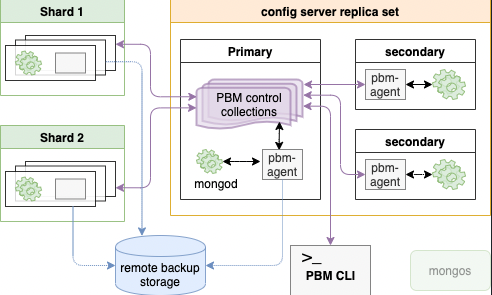
pbm-agentThe configuration related to backup management is stored in the config server, and it is assumed that AWS S3 or a similar service will be used for storage of backups.
Since the secondary within each replica set is essentially the target of the backup, there is the advantage of separating and reducing the load on the production workload from the load during backup.
Furthermore, the backup function in the monitoring product PMM (Percona Monitoring and Management) appears to internally utilize PBM.
What you can do with PBM
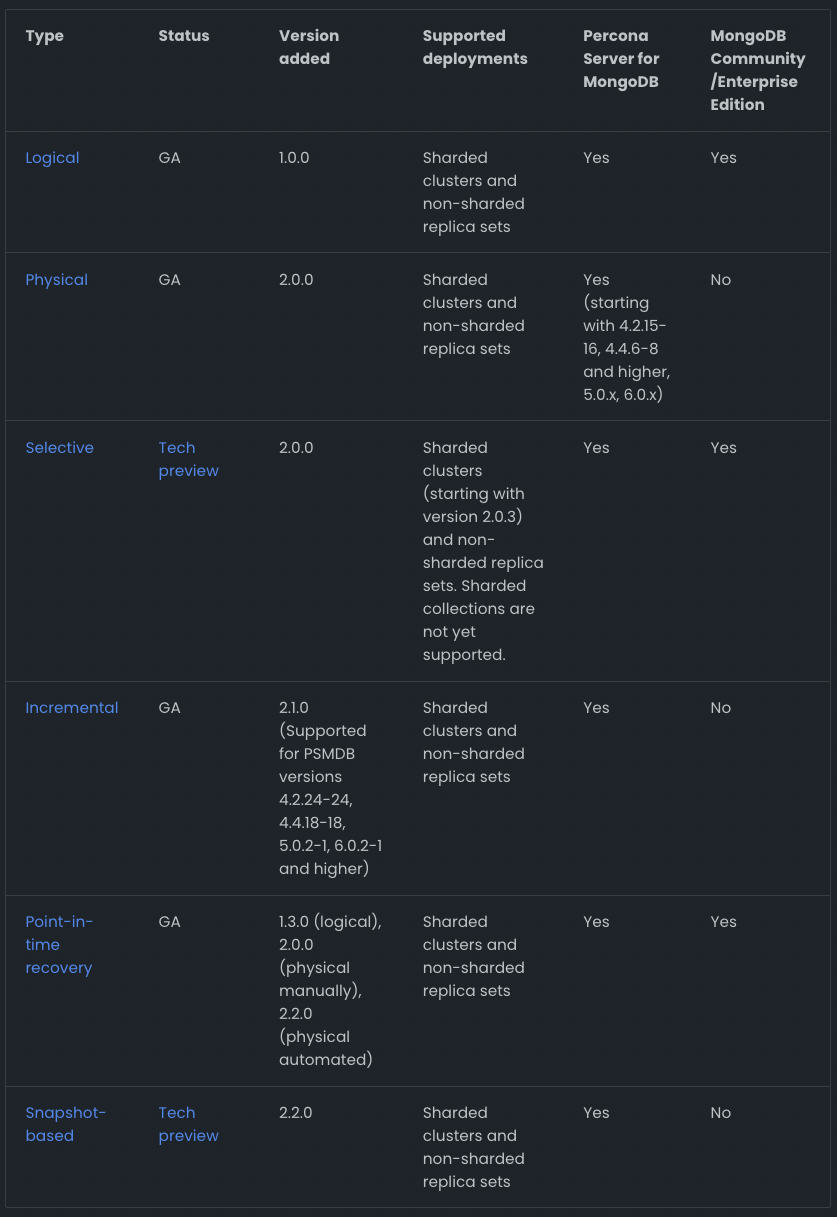
There appear to be differences in the backup types available for MongoDB Community and Percona Server for MongoDB.
I was planning to use the Community edition of MongoDB for this test, and it seems that the only features available in the Community edition are logical backups and PITR.
While logical backups tend to take a long time, which is a drawback, they are still very useful tools because they allow for online backups while maintaining consistency.
Trying out PBM in the MongoDB Community
PBM Setup
First, we deploy the sharded cluster to Kubernetes (using Minikube) (this is the most tedious part).
The mongod pod includes pbm-agent as a sidecar.
Additionally, we will use MinIO as the backup storage location.
I won't go into detail here, but I'll assume that you've already completed setting up replica sets and adding shards.
PBM_MONGODB_URINext, we will configure the backup storage. We will work in the pbm-agent container.
For MinIO, please prepare the appropriate access keys and buckets in advance.
Start pbm-agent on each mongod server.
pbm statusBackup-related operations
It appears that to maintain the consistency of full (logical) backups, each replica set captures its oplog until the backup of all replica sets is complete.
Therefore, the target for restoration will be the time when the backup was completed.
The main commands of the PBM CLI are as follows. Backup operations are very easy, simple, and straightforward.
Let's try a full backup and restore.
We will now proceed to restore verification.
test.dataA backup will be taken with 0 items.
Adding data.
There are a few things to check before restoring.
The main points to note regarding PBMs are as follows:
- Disable PITR before restoring.
- The collections that existed at the time of the backup are the ones to be restored.
- Collections created after a backup are not deleted during a restore (so, if you want to make things consistent, delete the collections).
Additionally, when restoring a shard cluster, it is still necessary to stop the balancer and prevent unnecessary updates from mongos, as before.
Restore. Verify that it has returned to 0 items.
Let's try Point-in-Time Recovery.
The PITR scenario involves adding 0 to 1000 data points and then verifying that the system can be restored to a specific time point. Here, we'll consider it acceptable if, after recovery, the number of data points is roughly between 0 and 1000.
First, enable PITR and take a base backup.
We will add data in stages, from 0 to 1000 entries.
After a full backup, if updates occur to the database, you can see that recovery points for PITR (Peace of Mind Recovery) are being recorded.
2023-11-28T11:20:53ZWe will verify that recovery is possible at a specific time.
This allowed me to recover at a specific time.
After the work is finished, re-enable PITR and take a base backup.
In conclusion
I looked into the functions of PBM (Play-by-Pay) software.
The Community edition only offers logical backups, and since we want to avoid long-running backups in a production environment, I felt it would be difficult to adopt it for our current product.
However, I think it could be a perfectly usable tool depending on the requirements for backup operations.
Even if we were to use Percona Server for MongoDB to enable physical backups, there are concerns such as it being removed from Cloud Manager management, so I think it would be great if more features became available in the Community edition.
SRG is looking for new team members.
If you are interested, please contact us here.
SRG runs a podcast where we chat about the latest hot IT technologies and books. We hope you'll enjoy listening to it while you work.