

Can the CLONE PLUGIN be used for backup operations with the latest MySQL 8.0?
This is Onikai (@fat47) from the Service Reliability Group (SRG) of the Technology Division.
#SRGThe Service Reliability Group primarily provides comprehensive support for the infrastructure surrounding our media services, focusing on improving existing services, launching new ones, and contributing to open-source software (OSS).
This article is located within SRG.DBWGThe DB Working Group is releasing database-related materials that it provides to the entire company.
I hope this is of some help.
Current problems with using XtraBackupCurrent backup operationsCurrent Restore ProcessProblems with XtraBackupNew feature in MySQL 8.0: CLONE PLUGINTo use CLONE PLUGIN instead of XtraBackupFull backupbinlog backupRestore processIn conclusion
Current problems with using XtraBackup
Current backup operations
In the service our team is responsible for, we use Percona's XtraBackup for MySQL backups, and we also back up the binlog separately every few minutes.
For example, the operation would be as follows:
| Backup types | frequency | means |
|---|---|---|
| Full backup | Once a day | Run XtraBackup via cron. |
| binlog backup | every 5 minutes | Run S3 sync using cron. |
Current restore process
We unpack the full backup taken with XtraBackup, check the binlog position at the time the backup was taken, and restore the data from that point onward by applying the data from the binlog backup.
Problems with XtraBackup
This approach worked fine even with MySQL 8.0.
MySQL8.0.29Until it arrives...
ALTER TABLE … ALGORITHM=INSTANTALGORITHM=INSTANTALGORITHM=INPLACE/COPY;As a side note, there was a critical bug related to this feature, and version 8.0.29 was withdrawn from public distribution immediately after its release. The official announcement then recommended using version 8.0.30 or later.
ALGORITHM=INSTANTIf even one table has this applied, the following error will be output when running XtraBackup.
ALTER TABLE ALGORITHM=COPYIf the target table is small, you can simply run OPTIMIZE or similar commands before each backup, but for very large tables, this can take a very long time.
ALGORITHM=INSTANTNew feature in MySQL 8.0: CLONE PLUGIN
To avoid the problems with XtraBackup mentioned earlier, I considered whether I could use the CLONE PLUGIN feature of MySQL.
Let me briefly introduce CLONE PLUGIN again.
CLONE PLUGIN is a new physical backup feature for MySQL, released in MySQL 8.0.17 in 2019.
In addition to saving the data locally as a file, you can also create a remote copy from the data provider's (donor) server.
For example, if you want to add another replica, you can copy all the data from the data provider's (donor's) server by executing the following command.
*In reality, the following preparations are necessary when using CLONE from a donor.
MySQL on the data provider's (donor's) side
MySQL on the destination (recipient) side
To use CLONE PLUGIN instead of XtraBackup
As mentioned earlier, there are issues with using XtraBackup with MySQL 8.0.30 and later.
This chapter will examine backup procedures in MySQL 8.0.30 and later.
The following configuration is used to perform a CLONE PLUGIN on the Replica server to obtain a backup.
This assumes that you are uploading to object storage such as S3.
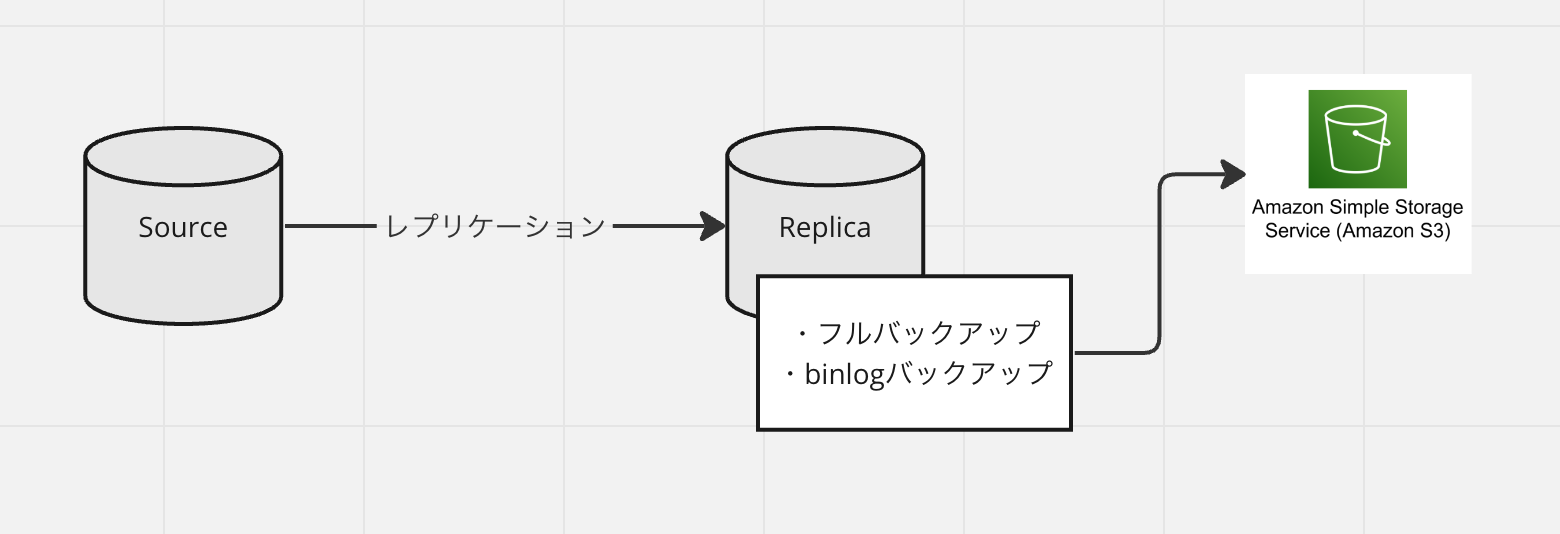
CLONE PLUGIN has limitations, such as only supporting InnoDB as its storage engine.
Please refer to the official documentation for details.
https://dev.mysql.com/doc/refman/8.0/ja/clone-plugin-limitations.html
This timeNon-GTID environmentI'll skip the S3 upload part and show you an example where the file is stored locally.
Full backup
(Perform this only the first time) Create a user to execute backups.
CLONE PLUGIN does not have a backup function for binlog files or my.cnf.
Since there's no way to know the MASTER POSITION at the moment the backup was taken, we stop the Replica replication, record the position, and then perform CLONE.
We will stop replication.
Record the position.
Perform a backup.
Resuming replication.
binlog backup
Use cron to periodically copy the binlog file to a separate directory using rsync or similar.
Restore process
- We will stop MySQL.
- The full backup obtained using CLONE will be extracted to the MySQL directory.
- Changes made since the last full backup are extracted from the binlog file.
- Check the position file that was recorded earlier.
- Check the binlog file for updates since the full backup.
- Generate a query for recovery.
Specify the position shown above for `start-position`, and specify all binlog files from the time of the full backup onwards for the binlog files to be loaded.
- Start MySQL.
- We will run a recovery query on the running MySQL instance.
- This allowed me to restore the full backup plus any subsequent changes.
In conclusion
As demonstrated here, CLONE PLUGIN can also be used in a similar way to XtraBackup.
If you are using MySQL 8.0.29 or later, I recommend considering either using XtraBackup + OPTIMIZE TABLE or using the CLONE PLUGIN as described here.
Although I didn't cover it this time, CLONE PLUGIN makes adding replicas much easier than the traditional method, and it's very convenient, so I'd like to take advantage of it.
SRG is looking for new team members.
If you are interested, please contact us here.