

AWS Public IPv4 Pricing Changes and How to Estimate the Cost for Your Environment
This is Onikai (@fat47) from the Service Reliability Group (SRG) of the Technology Division.
#SRGThe Service Reliability Group primarily provides comprehensive support for the infrastructure surrounding our media services, focusing on improving existing services, launching new ones, and contributing to open-source software (OSS).
This article introduces AWS's new paid public IPv4 service, and summarizes a simple way to calculate the cost and other ways to check the fees.
Changes to public IPv4 pricingHow to check how much it will cost in your environmentMethod 1: Check using the Public IP Insights feature of Amazon VPC IP Address Manager (IPAM).Method 2: Check from Cost & Usage ReportsMethod 3: Check using AWS Cost ExplorerIn conclusion
Changes to public IPv4 pricing
As mentioned in this article, the pricing structure for public IPv4 will change from February 2024.
Here is a table showing the changes in costs.
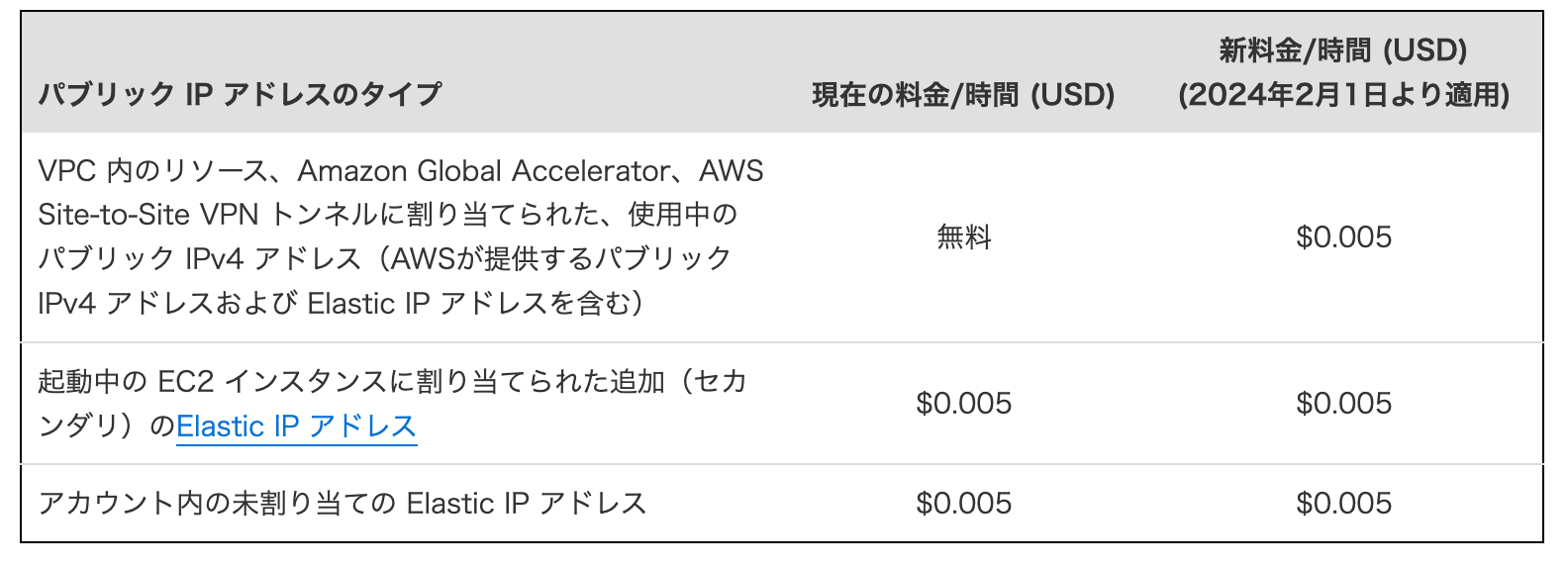
Until now, IPv4 was available for free within the specified conditions, but as described above, all IPv4 services will now be subject to charges.
At $0.005 per hour, using one IP address for 30 days would cost $3.60.
For more detailed information and strategies to reduce these costs, please refer to our developer blog, where we have published an article.
How to check how much it will cost in your environment
Method 1: Check using the Public IP Insights feature of Amazon VPC IP Address Manager (IPAM).
I think this method is the easiest and most reliable.
This is an additional feature released today. Originally, a feature called Amazon VPC IP Address Manager was released around 2021.
This is a paid feature for managing IP addresses within a VPC.
However, the newly released Public IP Insight feature is available for free.
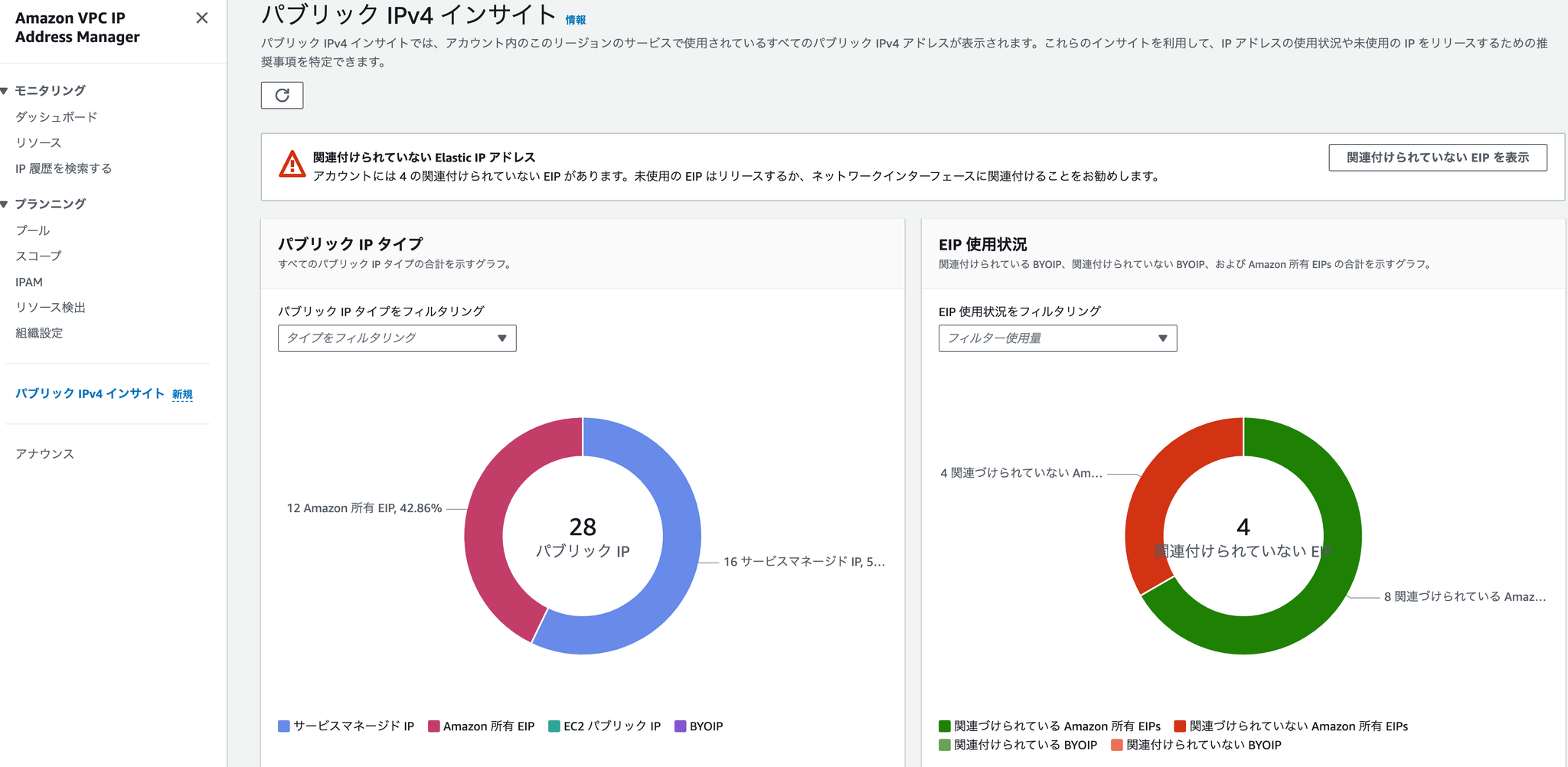
You can access it from "VPC" → "VPC IP Address Manager" → "Public IPv4 Insights".
Following the change in pricing structure, it seems safe to assume that you will be charged only for the number of public IP addresses displayed here.
This issue affects not only EIPs attached to EC2 instances, but also public IPv4 addresses attached to managed services like RDS and ELB, so the impact is likely to be significant.
Method 2: Check from Cost & Usage Reports
As of July 30, 2023, IPv4 usage is now recorded in Cost & Usage Reports.
"Billing" → "Cost & usage reports" → "Create usage report"
Selecting a service VPC will generate a report.
However, there doesn't seem to be any way to filter by usage type at the moment, so it's very difficult to use. I don't really understand it.
Method 3: Check using AWS Cost Explorer
This method will only allow you to verify the changes once the pricing structure has actually been updated and billing has begun.
Since IPv4 will be added to the pricing categories in Cost Explorer, you will be able to check your usage.
In conclusion
The fee structure change will take effect in about six months. It would be a good idea to calculate the estimated cost in advance and consider which method to use as soon as possible.
While it's still difficult to completely eliminate IPv4 due to various constraints, we'd like to gradually work towards improvements.
SRG is looking for new team members.
If you are interested, please contact us here.
SRG runs a podcast where we chat about the latest hot IT technologies and books. We hope you'll enjoy listening to it while you work.