

Aurora MySQL 3.08.0 (compatible with MySQL 8.0.39) has been released! Has the slow SELECT COUNT issue been improved!?
This is Yuta Kikai (@fat47) from the Service Reliability Group (SRG) of the Media Division.
#SRGThe Service Reliability Group primarily provides comprehensive support for the infrastructure surrounding our media services, focusing on improving existing services, launching new ones, and contributing to open-source software (OSS).
This article investigates whether the issue of slow SELECT COUNT operations in the past has been resolved following the release of AWS Aurora MySQL version 3.08.0 (compatible with MySQL 8.0.39).
I hope this is of some help.
Aurora MySQL 3.08.0 (MySQL 8.0.39 compatible) released!A selection of update items that caught my attentionCloudWatch metrics relatedGlobal status variablesWhat is the global status variable aurora_temptable_ram_allocation?Has the slow SELECT COUNT been improved?Reproduction verificationCOUNT resultNote that the support period is shorter than that of the LTS 3.04 series.In conclusion
Aurora MySQL 3.08.0 (MySQL 8.0.39 compatible) released!
Aurora MySQL 3.08.0 (MySQL 8.0.39 compatible) was released on November 18, 2024 (November 19 in Japan time)!
Here are some excerpts from the official What's New release article and its contents.
MySQL 8.0.39 includes several security enhancements and bug fixes, as well as improvements to database availability when dealing with a large number of tables, and enhancements to mitigate InnoDB issues related to redo logging and indexing. Aurora MySQL 3.08 also includes several availability improvements to reduce database restarts, improved memory management telemetry with new CloudWatch metrics, optimizations for major version upgrades from Aurora MySQL 2 to 3, and general improvements to memory management and observability.
A selection of update items that caught my attention
Next, let's take a look at the release notes.
In addition to improved availability and enhancements, it appears that many new metrics have been added.
CloudWatch metrics related
Three new Amazon CloudWatch metrics have been added to allow users to monitor the InnoDB purge process.
PurgeBoundary
PurgeFinishedPoint
TransactionFinishedPoint
We've added a new CloudWatch metric to help users identify long-running transactions that may be interfering with purge boundaries.
TransactionAgeMaximum
We've added three new CloudWatch metrics to help you avoid out-of-memory (OOM) errors.
AuroraMillisecondsSpentInOomRecovery
AuroraNumOomRecoverySuccessful
AuroraNumOomRecoveryTriggered
We changed three CloudWatch metrics from run totals to incremental counters to avoid out-of-memory (OOM) errors.
AuroraMemoryNumDeclinedSqlTotal
AuroraMemoryNumKillConnTotal
AuroraMemoryNumKillQueryTotal
Global status variables
We've added two global status variables that indicate the amount of memory used by internal temporary tables.
aurora_temptable_ram_allocation
aurora_temptable_max_ram_allocation
aurora_temptable_ram_allocation
In Aurora MySQL 3, there was a certain issue that I've covered in previous articles.
A parameter called `temptable_max_ram` was added in MySQL 8.0, and it is set to the following value by default:
- Maximum value of the common memory pool for temporary tables
16MB
I will quote a portion from the above article.
Starting with Aurora MySQL Version 3 (MySQL 8.0), the default storage engine for temporary tables has been changed to the TempTable storage engine.TempTable creates a temporary table in memory, but if its size exceeds the set value,Save the overflowed data to storage.。First, it writes to local storage, and if that also overflows, it writes to the shared cluster volume.but,Aurora's leader instance cannot write to shared cluster volumes, so queries will fail once local storage is full.This is the result.
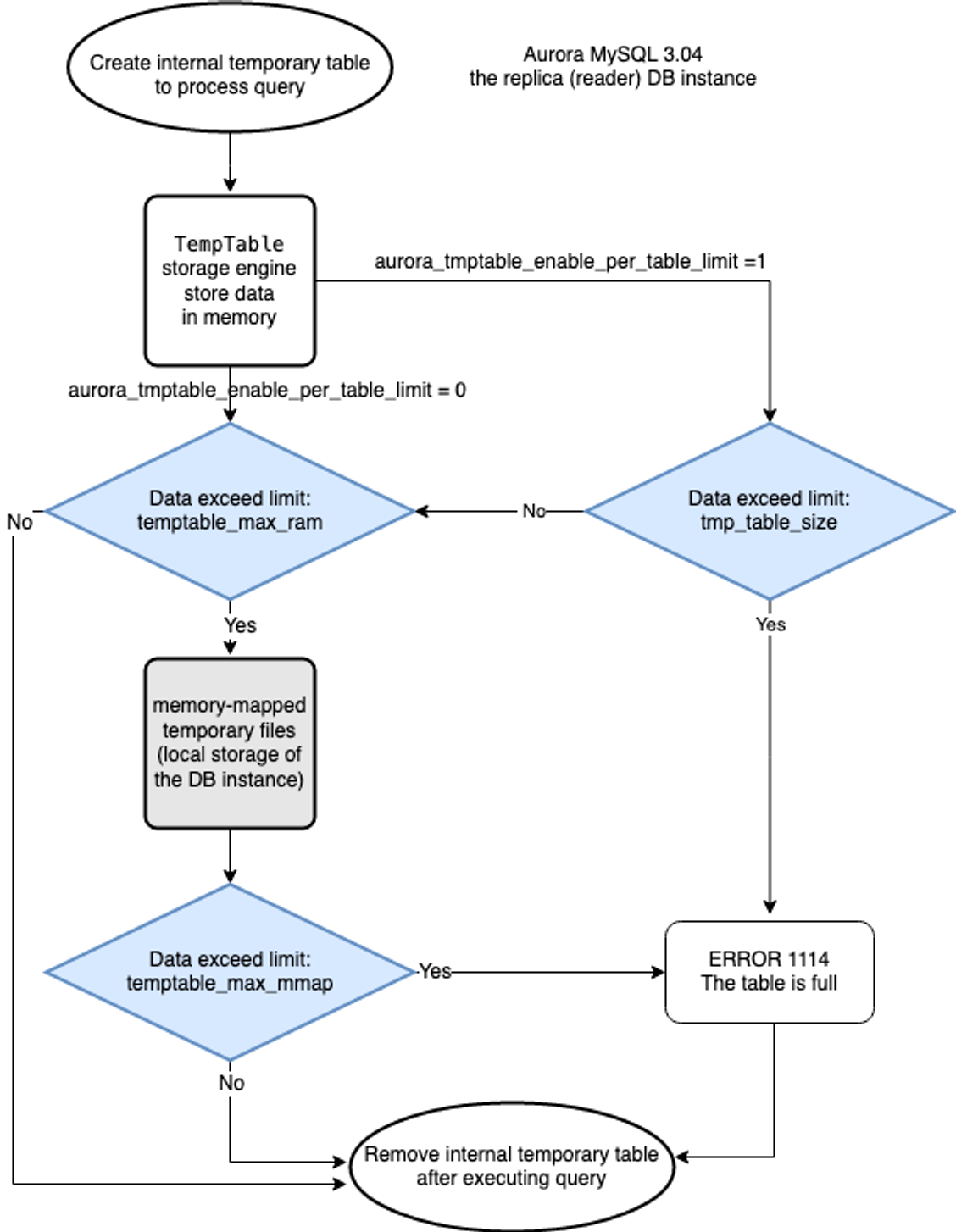
In short, the following information can now be viewed using the two newly added global status variables.
aurora_temptable_ram_allocation- The current amount of memory (in bytes) used by the internal temporary table.
aurora_temptable_max_ram_allocation- The maximum amount of memory (in bytes) used by the internal temporary table at any given time since the last reboot.
ThisYou can monitor whether the memory allocated for the temptable is about to overflow.Therefore, query errors on the leader instance side can be avoided.
Has the slow SELECT COUNT been improved?
Also, in a previous blog post, I wrote about how SELECT COUNT becomes slow in MySQL 8.0.
This article explains:
While MySQL 8.0 sometimes experienced SELECT COUNT being tens of times slower than MySQL 5.7, this issue was improved in MySQL 8.0.37.
That's what it says.
Has this issue been improved in the new MySQL 8.0.39 compatible engine? I will investigate.
Reproduction verification
Table creation and data generation
COUNT result
Aurora MySQL 3.08.0 (MySQL8.0.39 compatible)
I'll also check with the previous engine version, just in case.
Aurora MySQL 3.07.1 (MySQL 8.0.36 compatible)
With 300,000 records12 secondsSELECT COUNT, which was also applied0.068 secondsWe were able to confirm that it has been improved.
Note that the support period is shorter than that of the LTS 3.04 series.
While version 3.08.0 boasts many excellent improvements, please note that its support period is short as it is not an LTS (Long-Term Support) version.
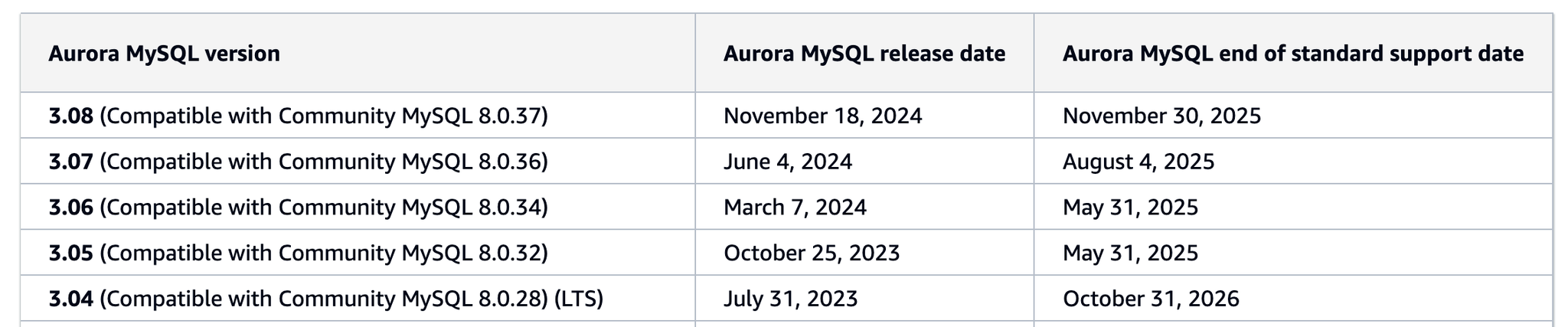
The standard support period for version 3.08 ends in approximately one year.November 30, 2025It is until [date].
LTS version 3.04 is valid until October 31, 2026, so this will be a shorter period.
In conclusion
I feel that many of the issues I was concerned about have been significantly improved in this 3.08.0 release!
Thank you, AWS!!
Many other feature improvements have also been made, so please check them out.Release NotesPlease check.
SRG is looking for new team members.
If you are interested, please contact us here.